
Headless vs headful browser: when does your AI agent need a window?
- Modern headless Chrome renders pages, runs JavaScript and takes screenshots with no window, so a screenshot is not a reason to go headful.
- Use headful when the agent drives a desktop with a mouse and keyboard, or when a person must reach the window.
- In our headful Chrome 154 tests, Google served searches when navigator.webdriver was false and returned /sorry when that property was true.
- The 7 October 2026 bench measured headful browsers only, so it shows no headless saving in RAM or CPU.
- Epoch AI puts the drop in cost for a fixed level of model performance at about 13 times per year since 2023.
Your AI agent can take browser screenshots without opening a window. Modern headless Chrome renders the page, runs JavaScript and captures the image on its own. A screenshot is not a reason to go headful.
Headful means a window is open, on a physical display or a virtual one. Choose it when the agent drives a desktop with a mouse and keyboard, or when a person must reach that window. Reading the page does not require it.
The window did not decide our Google results. In our headful Chrome 154 tests, Google served searches when navigator.webdriver was false and returned /sorry when that property was true.
This bench measured headful browsers only. It shows no headless saving in RAM or CPU. Epoch AI puts the drop in cost for a fixed level of model performance at about 13 times per year since 2023. Memory, SSDs and some cloud servers have moved the other way. The mode still has to fit the computer you keep.
1What is the difference between a headless and a headful browser?
A headless vs headful browser split, on modern Chrome, is the window. Headless runs with no visible window. Headful, also called headed, runs with a window on a real display or a virtual one. Chrome's documentation calls the modes unified: one browser, with or without a window. Both can render a page and take a screenshot.
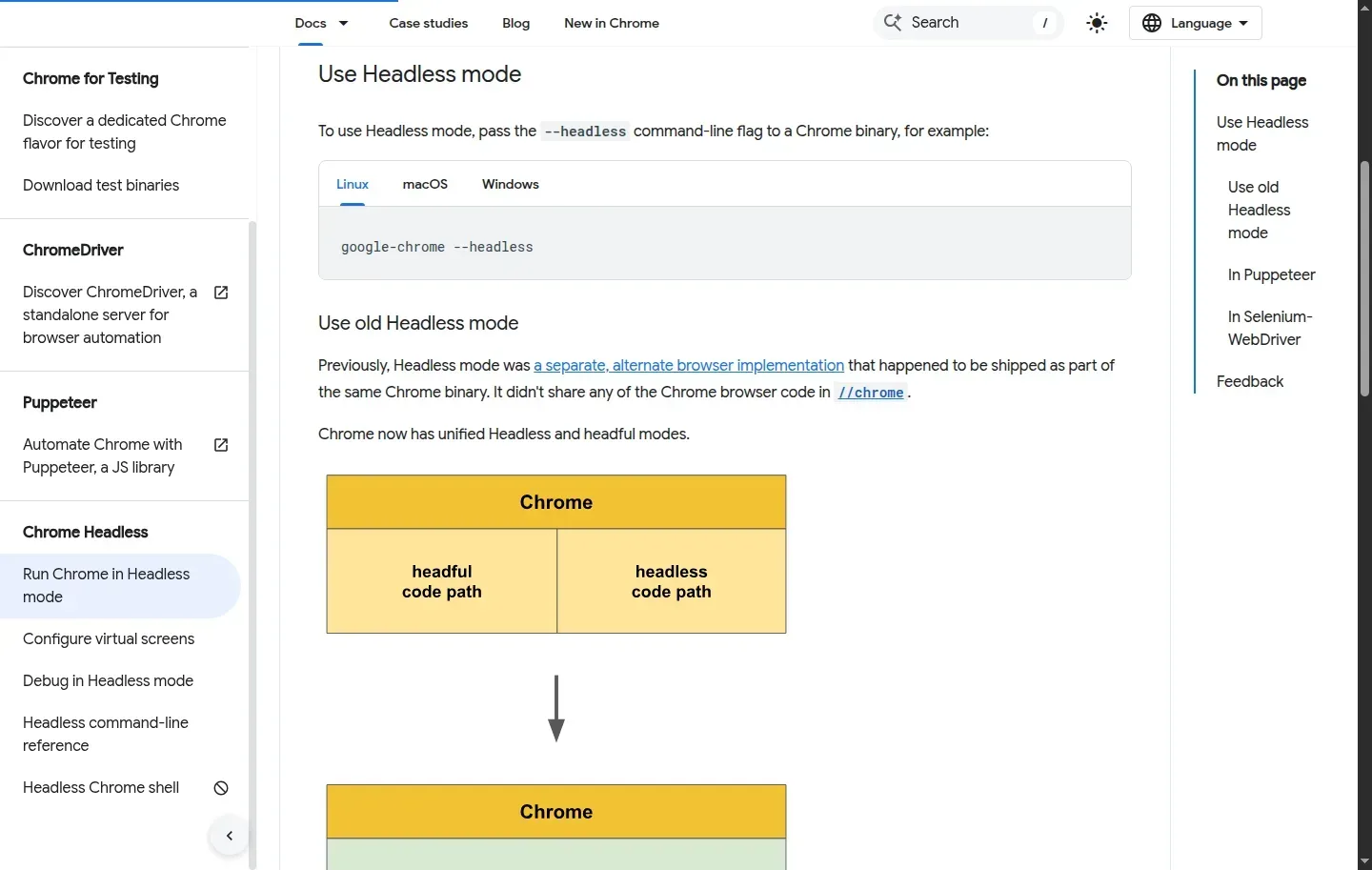 Chrome's documentation calls modern headless and headful one browser, with or without a window. Both can render a page and take a screenshot. This page is the vendor's description, not a RAM or CPU result from our bench.
| Modern Chrome headless | Headful | |
|---|---|---|
| Visible window | No | Yes |
| Page rendering, JavaScript, screenshots | Yes | Yes |
| Display | None | A display server, physical or virtual |
Headful does not need a monitor in the room. Our 7 October 2026 bench drew its windows on a hidden Xvfb display. Anthropic's computer-use reference also uses a virtual X11 display, Xvfb, inside Docker. That setup is headful. The window is simply not on a physical screen.
The window is only the first split. Chrome has shipped two different headless implementations, and advice for one does not travel to the other.
2What is the difference between Chrome headless modes?
Chrome has two headless implementations. Advice written for one can misfire on the other.
Unified headless arrived in Chrome 112 as --headless=new. Chrome's removal note records that. From Chrome 132.0.6793.0, the old implementation remains only as the separate chrome-headless-shell binary. Chrome's headless documentation states that limit.
| Unified headless | Old headless shell | |
|---|---|---|
| What it is | The same browser as headful mode | The old implementation, kept as its own binary |
| Since | Chrome 112 (--headless=new) |
Only in chrome-headless-shell from 132.0.6793.0 |
| What we measured | Nothing. This bench was headful | Nothing |
Check which binary a tool or a write-up means before you copy its advice. The next table keeps that split, and it stops where our measurements stop.
3How do headless and headful browser architectures compare?
Removing the window does not by itself swap the browser. Unified headless is still Chrome. The shell is a different binary. Our own runs speak only for headful Chrome on a virtual display.
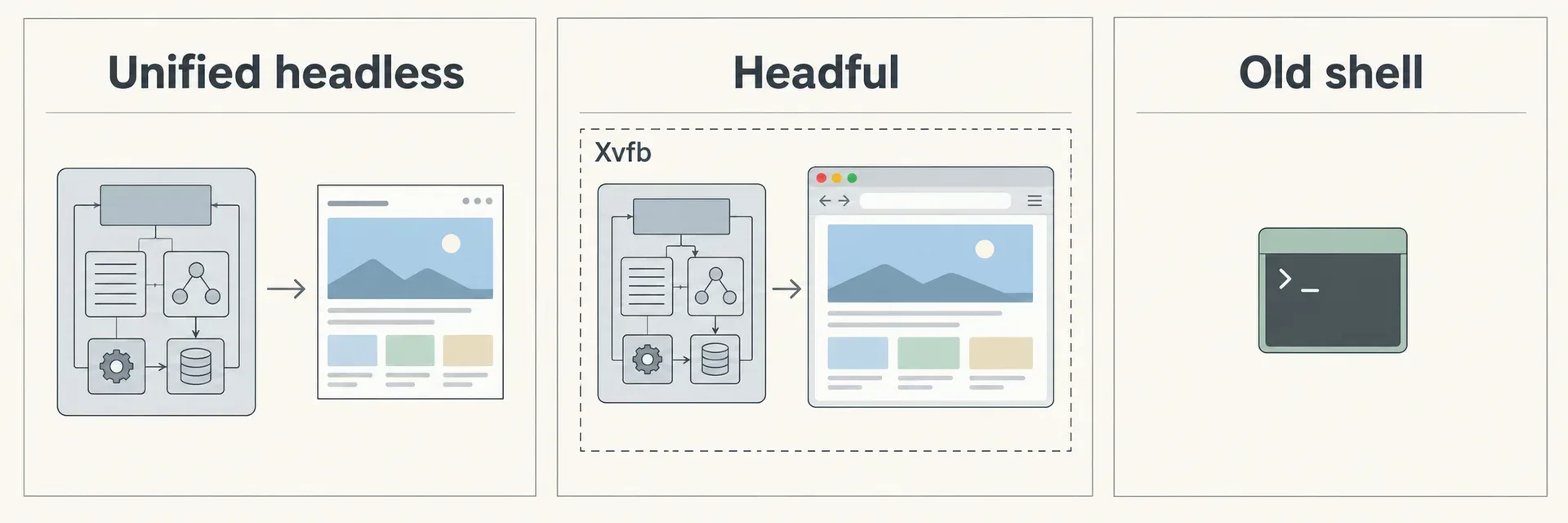
| Implementation | Architecture | Window and display | What we can say about rendering | Decision |
|---|---|---|---|---|
| Unified Chrome headless | Same browser as headful, per Chrome's docs, since Chrome 112 | No visible window | Docs say this browser can take screenshots. We did not measure it | Page work that needs Chrome's behaviour and does not need a visible window |
| Headful Chrome | Chrome with a window | Physical or virtual display. Ours was hidden Xvfb | WebGL reported Intel UHD 630 through ANGLE. No SwiftShader fallback in that setup. WebGPU reported no adapter on this Intel iGPU under Xvfb | Desktop control, or a window a person must reach. We did not verify remote takeover |
chrome-headless-shell |
Old headless, only in this binary since Chrome 132.0.6793.0 | Not measured here | Not measured here | Use only when you have confirmed your tool is launching this binary, and do not treat our Chrome figures as its figures |
Lightpanda was running on the bench machine and was left untouched. It was not in the measured set, so this table does not describe its engine or its screenshots.
Chrome's docs are the source for the unified-mode row. They are not a RAM or CPU result. For measured headful cost per agent, the last section has the figures we do have.
4Can headless Chrome render JavaScript and take screenshots?
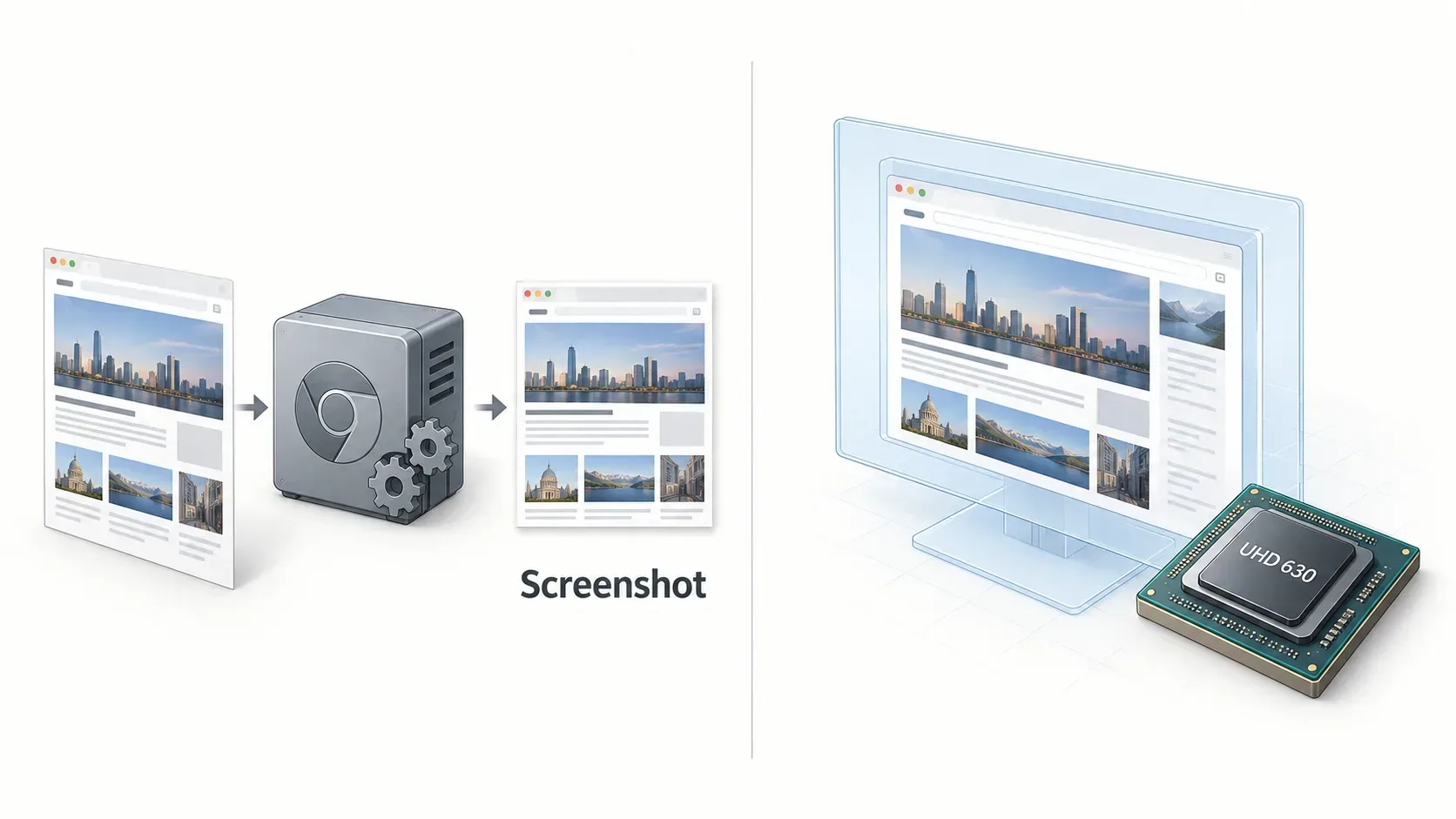
Yes. Unified headless is the same browser as headful mode, and Chrome's documentation says it renders pages and takes screenshots with no window. Three checks still decide whether that is enough for your agent.
- Which implementation is it? Unified headless and
chrome-headless-shellare not the same binary. The section above is the split. - Which renderer is it? On our headful bench, WebGL reported
ANGLE (Intel, Mesa Intel(R) UHD Graphics 630 (CFL GT2), OpenGL ES 3.2). That is the Intel UHD 630, with no SwiftShader fallback. WebGPU still reported no adapter on that iGPU under Xvfb. Cromite is the exception among the builds we launched: it ships WebGL off and reportednone. Microlink measured about 24 seconds per 3D-page screenshot on SwiftShader, against about 6 seconds on Mesa llvmpipe. Both of those are software renderers. The times compare renderers, not headless against headful. - Which page features matter? Match the test to the graphics, media and interactions your pages use. We did not run a matched headless rendering test, so this bench cannot answer that check.
A screenshot being possible is not the same as the screenshot matching a headed GPU session. If your agent only needs the image, unified headless can produce one. If it needs the GPU path we actually recorded, that record is headful.
5When should an AI agent use a headless or a headful browser?
Use headless for programmatic page work that does not need a visible window. Use headful when the agent drives a desktop, or when a person must reach the window. Neither image input nor an accessibility tree, on its own, settles the mode.
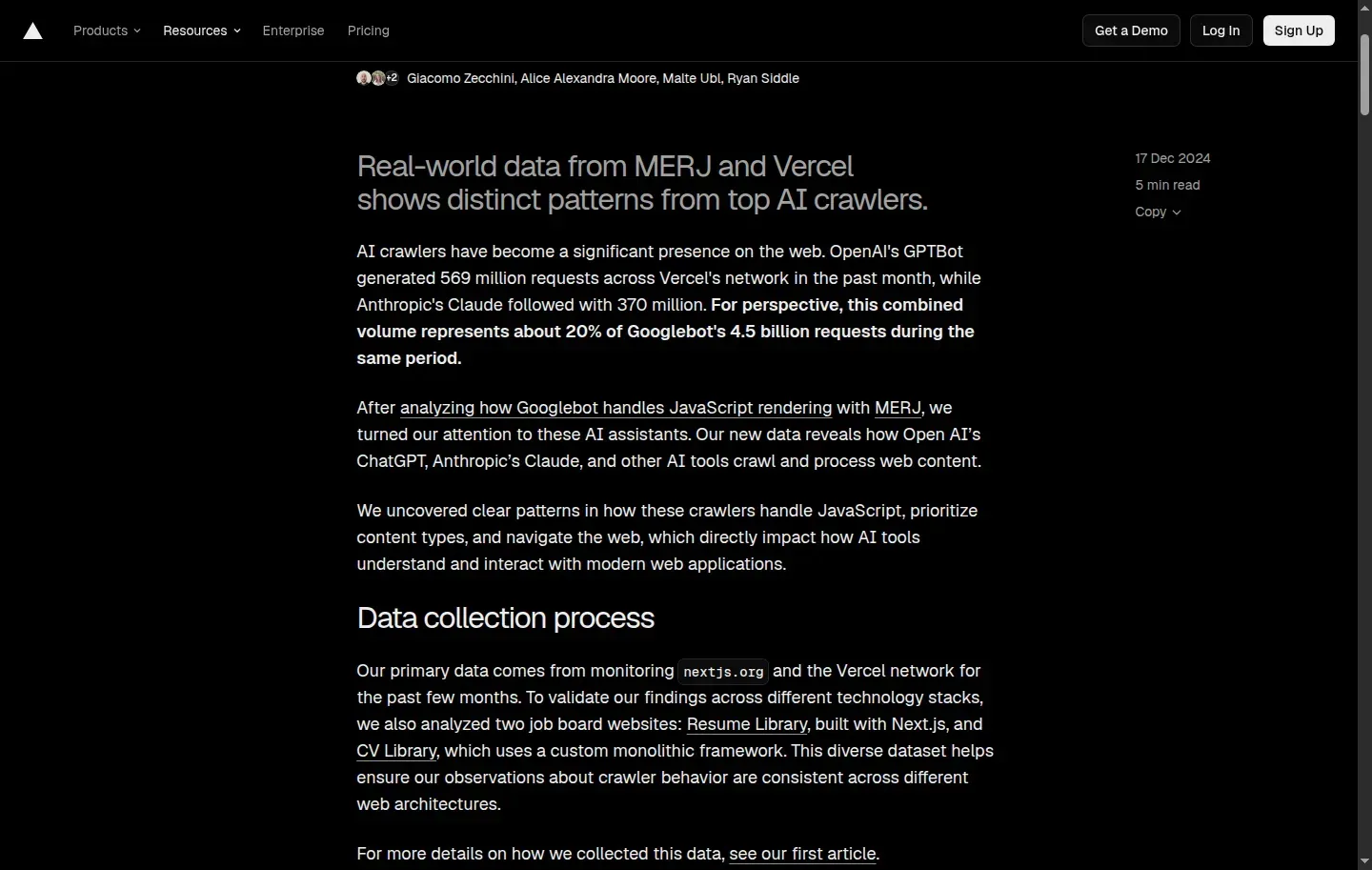 Vercel’s 17 December 2024 count is the source for which crawlers rendered JavaScript. GPTBot, OAI-SearchBot, ChatGPT-User, ClaudeBot and PerplexityBot fetched HTML. Gemini, via Googlebot, and AppleBot rendered it. That report is not a 2026 retest, and it does not choose headless or headful for an agent that does open a browser.
Some agents never open either kind of browser. Vercel reported on 17 December 2024 that GPTBot, OAI-SearchBot, ChatGPT-User, ClaudeBot and PerplexityBot did not render JavaScript. They fetch HTML. Gemini, via Googlebot, and AppleBot did render it. That report is a 2024 count, not a 2026 retest.
| Job | Mode | Limit of the evidence |
|---|---|---|
| Drive the page, no visible window needed | Unified headless, if it supports the tool's interactions | Chrome's docs confirm rendering and screenshots. We did not measure this mode |
| Read the accessibility tree | Either, until your tool says otherwise | Playwright MCP reads the tree, not pixels. Vision is opt-in with --caps=vision. It runs headed by default. A default is a tool choice, not proof the tree needs a window |
| Screenshots plus mouse and keyboard on a desktop | Headful, on a physical or virtual display | Anthropic's reference setup takes screenshots on Xvfb. OpenAI's Computer-Using Agent is described as reading raw pixels and driving a virtual mouse and keyboard. That supports the desktop job. It does not prove every screenshot agent needs headful |
| A person must reach the window | Headful, then check how the person reaches it | Our windows sat on a hidden virtual display. We did not verify a login handoff or a session-preserving remote takeover |
On a machine with its own display, our clean-browser helper opens a plain window for a person. On a server, the Xvfb window is invisible. A headful flag does not create a handoff we never tested.
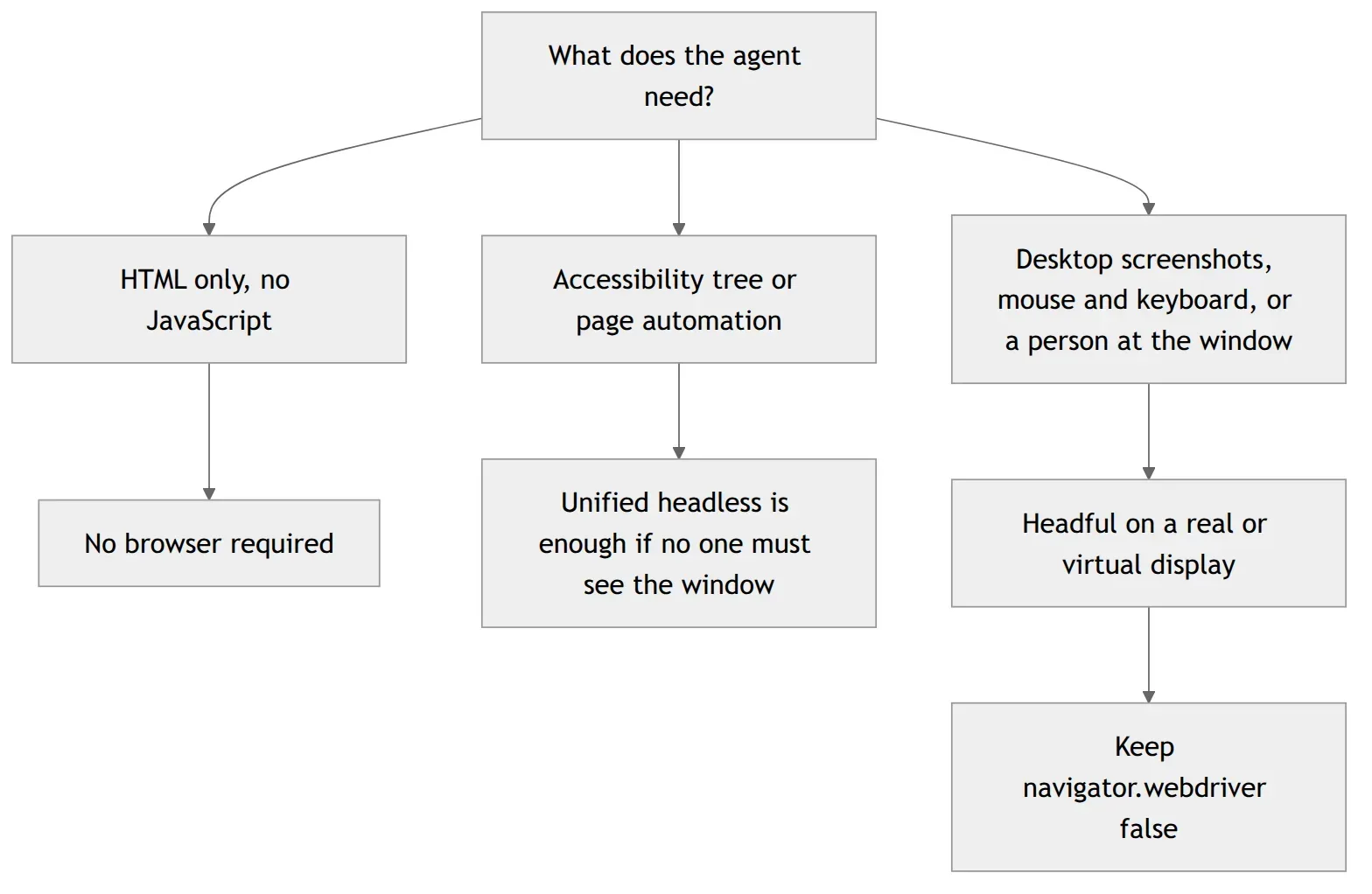
The diagram is the decision those sources support. It is not a memory ranking. Headful on a server with no monitor is a display problem, and that is the setup we ran.
6How do you run a headful browser on a Linux server with no monitor?
Put headful Chrome on an Xvfb virtual display. Our bench did that, and WebGL reported the Intel UHD 630 through ANGLE. The display hosted the windows. Remote viewing and a human takeover are separate steps, and we have not verified them.
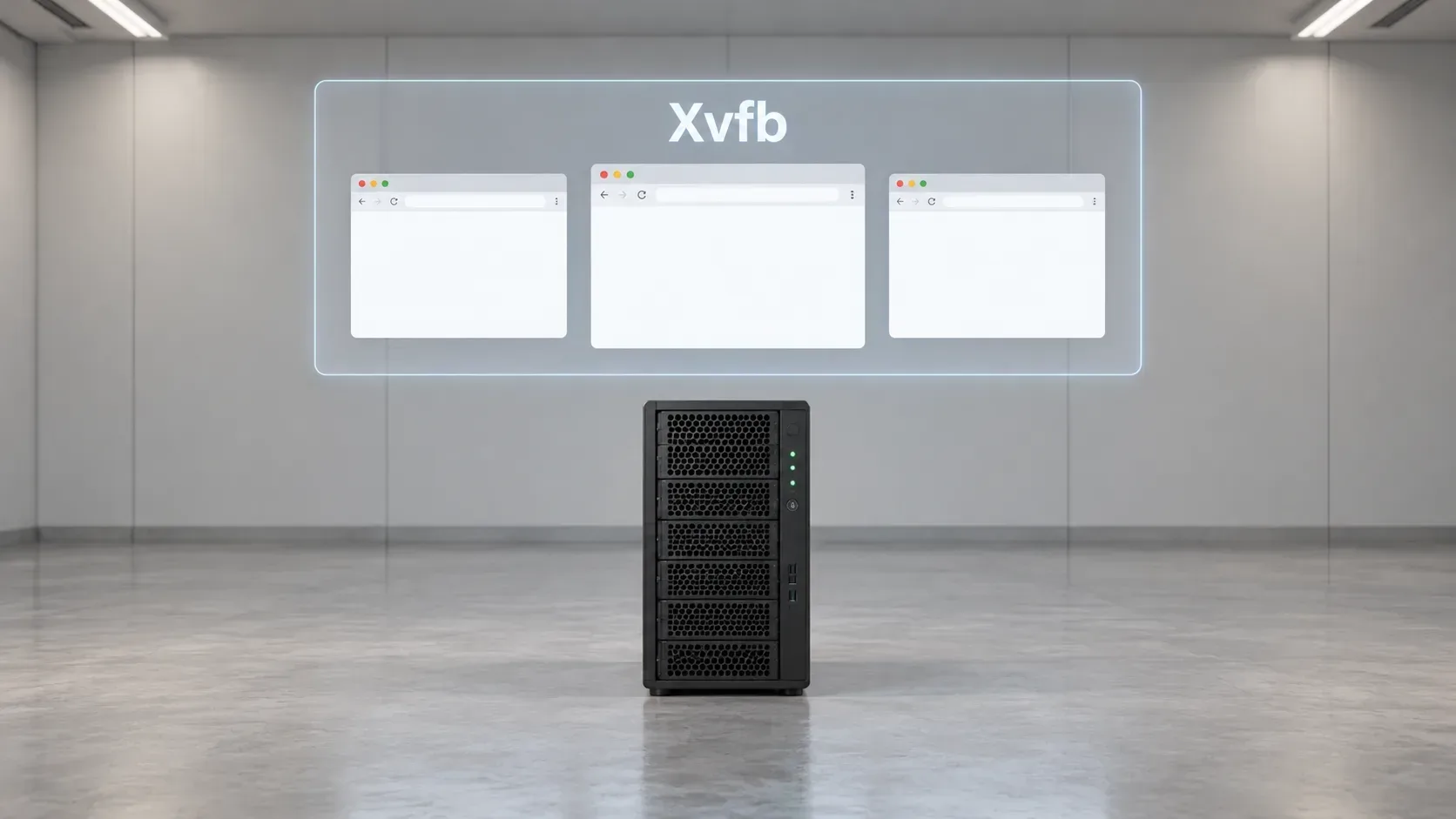
These are the settings we measured, not an install guide.
Start Xvfb. The bench used hidden display
:30at 1920×1080. Each Chromium held about six X connections. At the default 256 clients, that display stopped near 45 profiles.-maxclients 2048lifted the cap on the bench Xvfb. Raising the cap on fleet machines was still a proposed change, not one this article applies.Launch headful Chrome on that display. Windows were 1366×900, with
--use-gl=angle --use-angle=gl-egl. The windows stayed on Xvfb, so they were not on a monitor.Read the renderer string. WebGL reported
ANGLE (Intel, Mesa Intel(R) UHD Graphics 630 (CFL GT2), OpenGL ES 3.2). That is Intel UHD 630, not SwiftShader. WebGPU reported no adapter on this iGPU under Xvfb. Check the string on your own server before you assume the same path.
A hidden window was enough for those rendering checks. It was not what decided Google. The launch flag did.
7Why did Google block our automated searches when manual searches worked?
Hand searches in real Chrome, from the same home IP, kept working. The bench's own launches often got /sorry. The difference we isolated was navigator.webdriver, not the presence of a window.
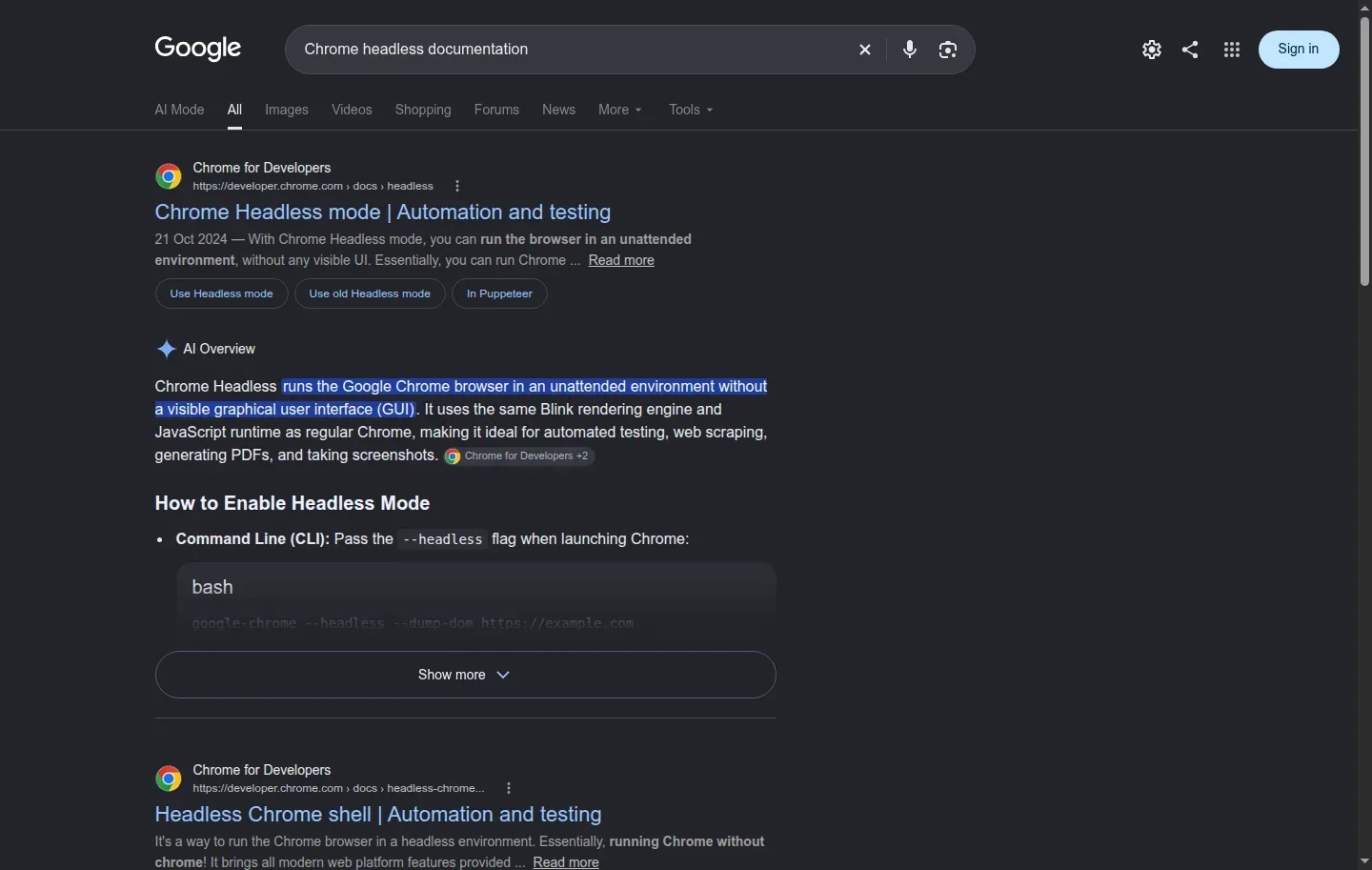 This results page came from a clean fixed-port Chrome session. In the headful ablation, searches with navigator.webdriver false were served. The window was on a hidden Xvfb display either way.
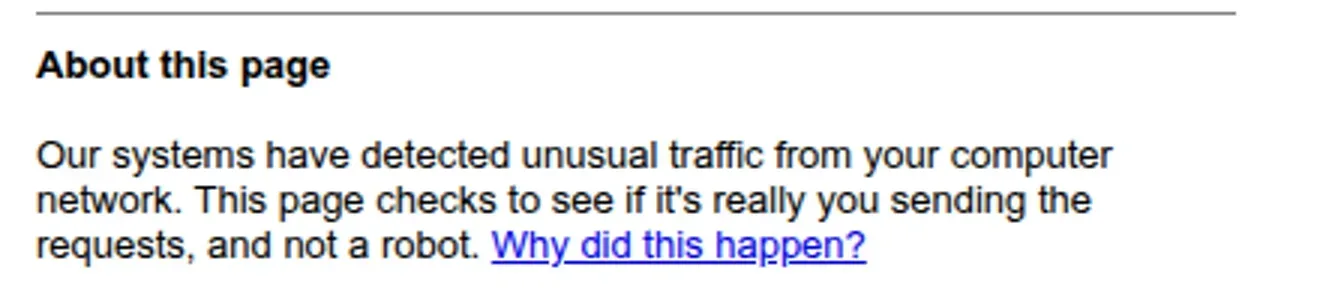 This /sorry page followed one Playwright-launch search. In the typed-search ablation, the Chrome launches that set navigator.webdriver true also returned /sorry. We cannot say what Google checked.
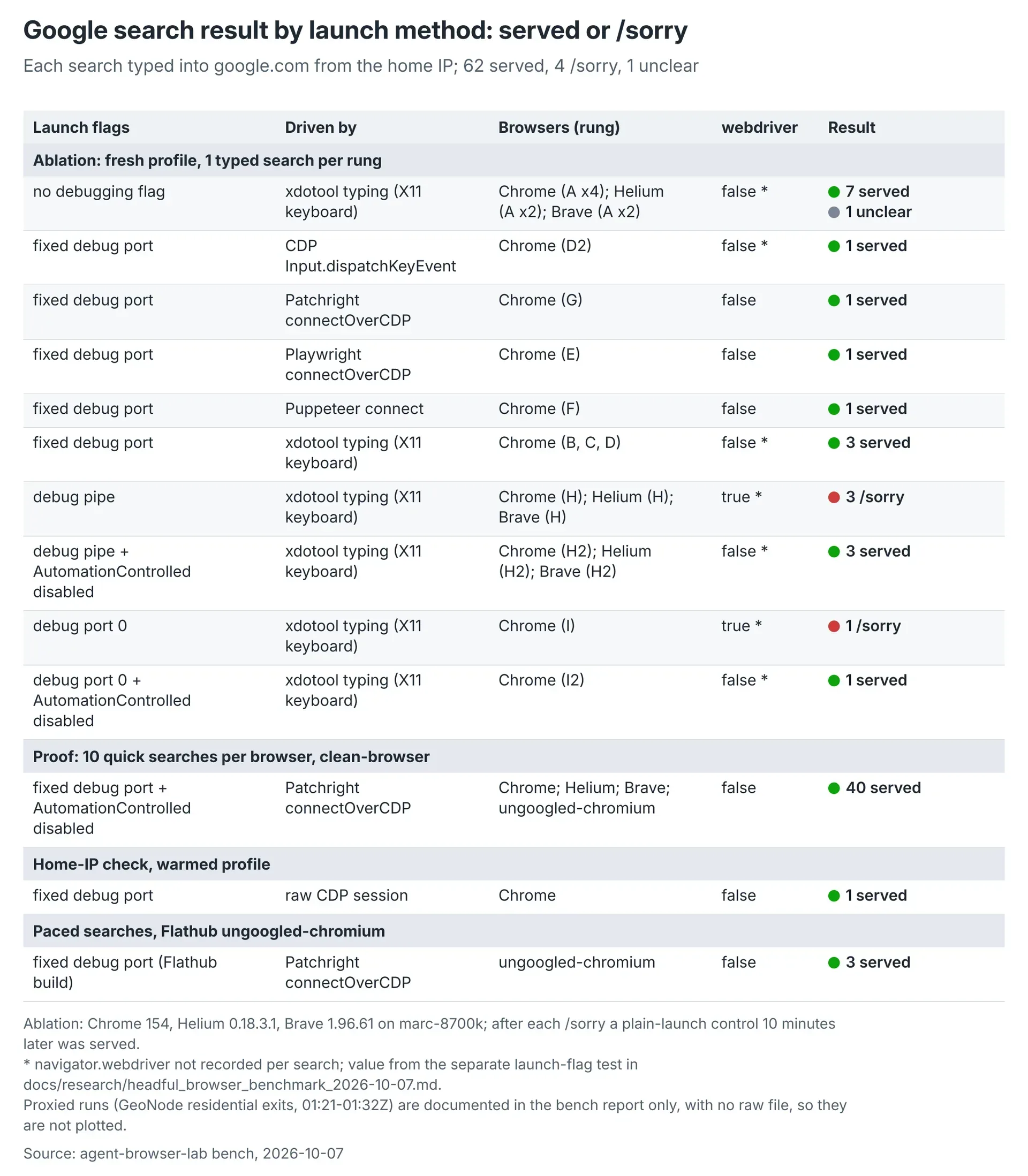 These 7 October 2026 headful records total 62 served searches, 4 /sorry pages, and 1 unclear result. The four /sorry rows are the pipe launches on Chrome, Helium and Brave, plus the Chrome port-0 launch. In each of those, navigator.webdriver was true. The 40-search proof block, through clean-browser and Patchright, was served. Headless with the property false was not tested.
navigator.webdriver is the property that reports automation control. The ablation used Chrome 154.0.8037.97 on an i7-8700K, with windows on a hidden Xvfb display. Every rung was a fresh, cookieless profile and one search typed into google.com. These are our 7 October 2026 tests.
Every rung with the property false was served. Both Chrome launches that set it true got /sorry.
| Launch | navigator.webdriver |
Google Search |
|---|---|---|
| Plain launch, no debugging flag, xdotool typing | false | Served |
Fixed --remote-debugging-port, nothing attached |
false | Served |
--remote-debugging-pipe |
true | /sorry |
--remote-debugging-port=0, nothing attached |
true | /sorry |
Pipe plus --disable-blink-features=AutomationControlled |
false | Served |
Port 0 plus --disable-blink-features=AutomationControlled |
false | Served |
After each block we waited 10 minutes and repeated the plain-launch control. Every control was served. A warmed profile was never required, and the home IP stayed clean across those controls. The pipe launch also drew /sorry on Helium 0.18.3.1 and Brave 1.96.61. Plain-launch controls for both were served 10 minutes later.
Fixed-port connections were served too. Playwright connectOverCDP, Puppeteer connect and Patchright connectOverCDP each got a served search, with the property false. Raw CDP did as well, including a rung that called Runtime.enable and a rung that typed through CDP key events.
A follow-up sent ten quick searches per browser through clean-browser plus a Patchright connection, from the home IP, one fresh profile each. Gaps were 5 to 10 seconds plus page load. Chrome 154, Helium 0.18.3.1 and Brave 1.96.61 each returned 10 of 10, with 8 to 10 organic results on Chrome and Helium and 7 to 9 on Brave.
We cannot say what Google checked. We can say what we measured. With the property false, those headful searches were served. With it true, they were not. Headless with the property false was never tested, so the window's own effect is unknown. Inside headful Chrome, the launch decided the outcome.
That launch list is the next piece. Several common tools set the property before they ask Google for anything.
8Which launch settings set navigator.webdriver to true?
Pipe and port-0 debugging launches set navigator.webdriver to true in headful Chrome 154. A fixed port, with no automation flag, left it false. The window did not keep the property false.
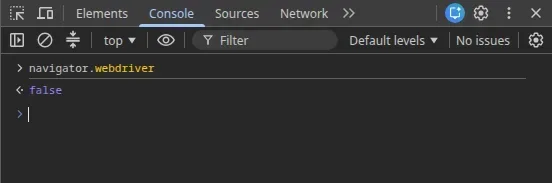 Headful Chrome 154 on a fixed debugging port, with no automation flag, left navigator.webdriver false. That is the same property the served searches had.
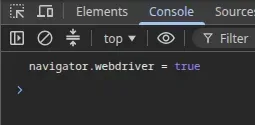 Pipe and port-0 debugging launches set navigator.webdriver to true in headful Chrome 154. Opening a window did not keep the property false.
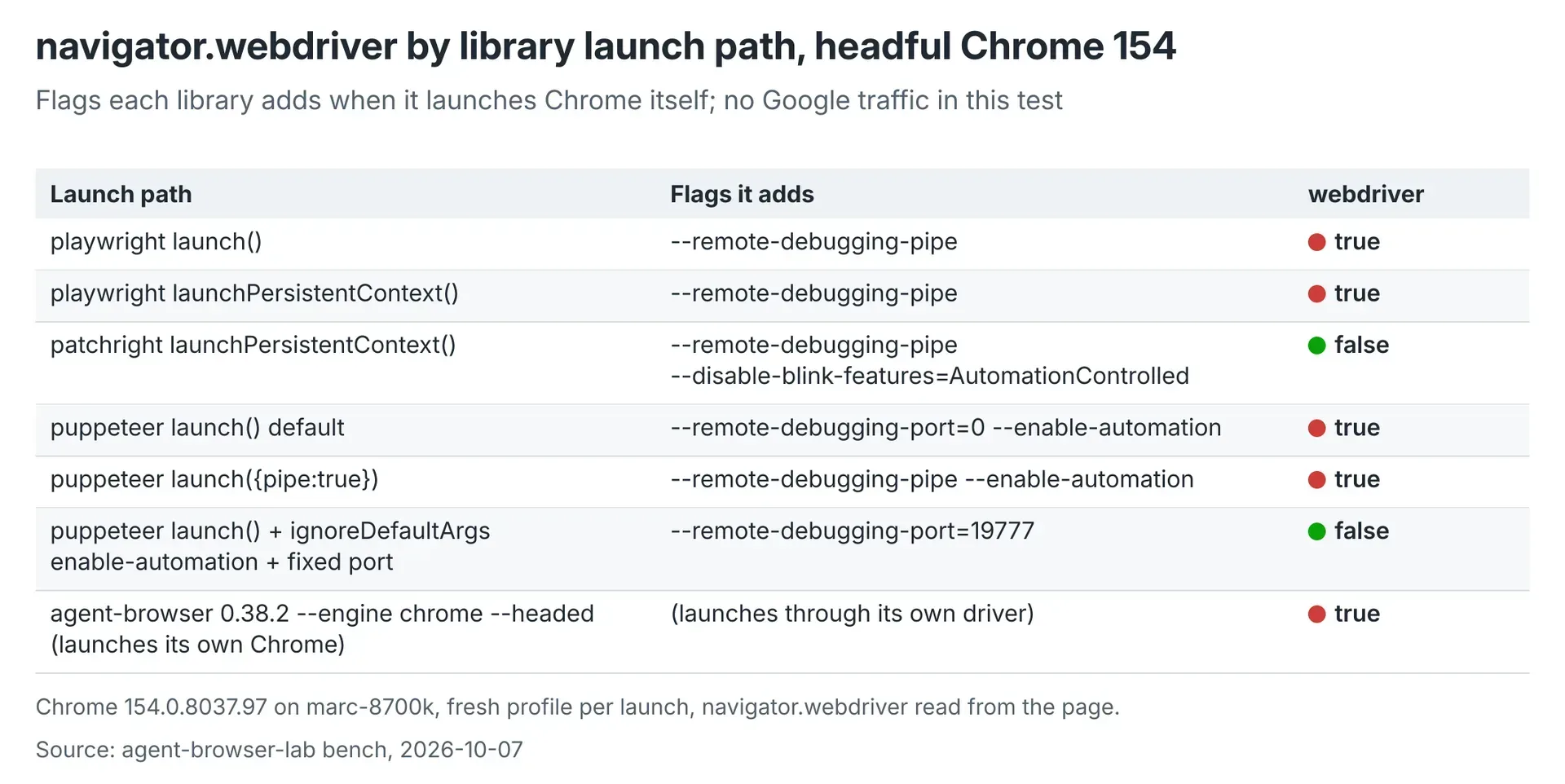 Each library launch() here ran against headful Chrome 154.0.8037.97 and sent no Google traffic. Patchright’s tested launch left navigator.webdriver false. Playwright’s two launch paths, Puppeteer’s default and pipe launches, and agent-browser 0.38.2 with its Chrome engine set the property true. Puppeteer left it false only after the automation flag was ignored and a fixed port was used. This table is these versions, not a headless result.
We also launched each library's own launch() against headful Chrome 154.0.8037.97 and read the property. Those runs sent no Google traffic. Patchright's tested launch left the property false. Every other path in the table set it true.
| Tested launch | Flags observed | navigator.webdriver |
|---|---|---|
Playwright chromium.launch() |
--remote-debugging-pipe |
true |
Playwright launchPersistentContext() |
--remote-debugging-pipe |
true |
Puppeteer launch() default |
--remote-debugging-port=0 --enable-automation |
true |
Puppeteer launch({ pipe: true }) |
--remote-debugging-pipe --enable-automation |
true |
agent-browser 0.38.2 --engine chrome --headed |
Through its own driver; flags not listed | true |
Patchright launchPersistentContext() |
--remote-debugging-pipe --disable-blink-features=AutomationControlled |
false |
Puppeteer launch() with ignoreDefaultArgs: ['--enable-automation'] and a fixed port |
--remote-debugging-port=19777 |
false |
| Chrome started on a fixed port, then a library connects | --remote-debugging-port=<n>, no --enable-automation |
false |
Library launch and library connection are different paths. In the ablation, Playwright connectOverCDP, Puppeteer connect and Patchright connectOverCDP attached to fixed-port Chrome with the property false, and those searches were served.
Headed mode did not save the runs that used a pipe or port 0. agent-browser's headed Chrome engine was true in this test. If a headed browser is blocked, read its flags and the property before you change mode.
The table is this headful configuration and these versions. It says nothing about other versions, and nothing about headless launches. Where the library's own launch sets the property, the path we measured was to start the browser ourselves and let the tool connect.
9How do you connect Playwright or Puppeteer to an existing Chrome?
Start the browser with clean-browser, then attach the tool to the local endpoint it prints. clean-browser is our helper, installed as /usr/local/bin/clean-browser. It is not a stock Chrome flag. It takes a profile directory and picks a fixed debugging port from that path.
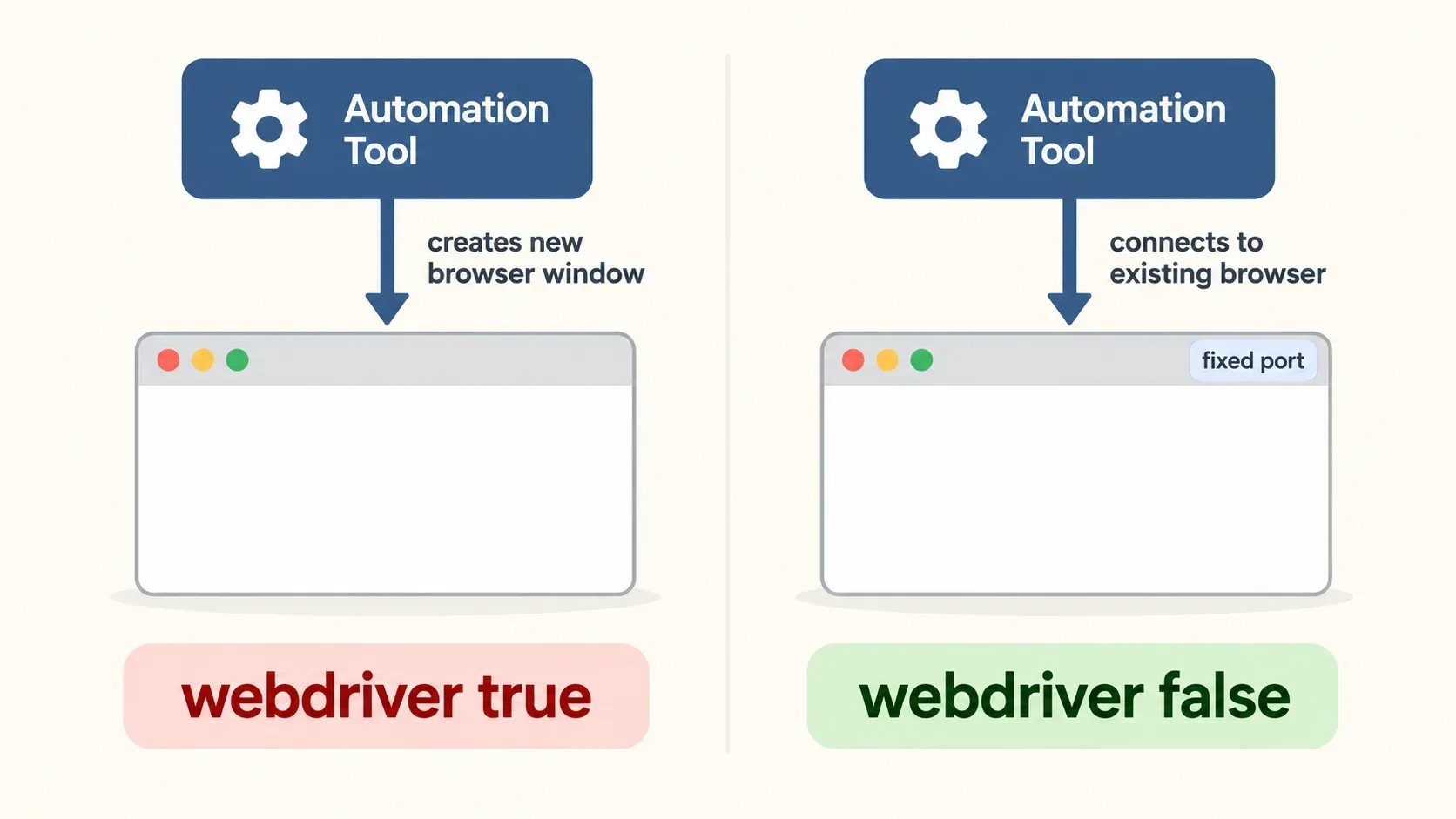
Launch with the profile you want.
clean-browser <browser> --profile <dir>The helper adds no
--enable-automation, no debugging pipe and no viewport emulation. It also does not add--disable-blink-features=AutomationControlled. That flag clearednavigator.webdriveron pipe and port-0 launches in our ablation, and those searches were then served. It also put a yellow "unsupported command-line flag" bar on windows people use. A fixed port kept the property false without it.Read the printed endpoint.
http://127.0.0.1:<port>The tested workflow connects on the same machine.
Attach. Our tested clients are Playwright
connectOverCDP, Puppeteerpuppeteer.connectandagent-browser --cdp. Each attaches to the browser that is already running. The same command can open a plain window for a person on a machine that has a display.
Playwright's tested launch() paths, and Puppeteer's default launch(), set navigator.webdriver to true. Chrome that we had already started on a fixed port kept the property false while those libraries connected. In the Google ablation, connectOverCDP and Puppeteer connect received results that way, on fresh profiles from the home IP.
Connecting was the path Google served in these tests. It promises nothing about other library versions or other sites.
10Do Google results predict other bot checks?
No. The ablation is one site, under our conditions. Keep three records apart: the searches we ran, the detector warnings we collected, and the checks we never finished.
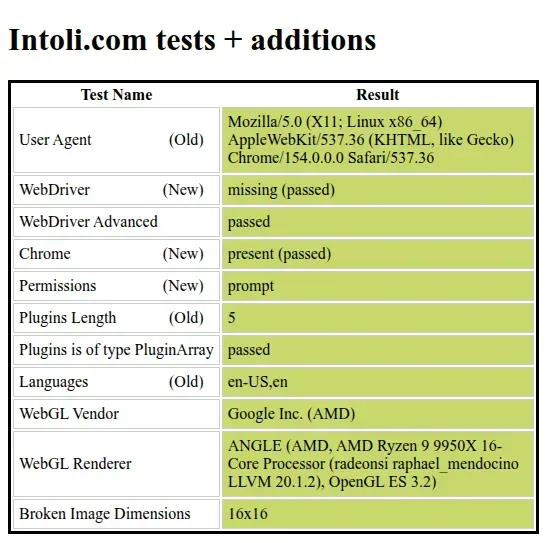 In the clean-browser plus Patchright follow-up, sannysoft showed 0 failed on Chrome. That session also received Google results. A passed detector page is a separate record from those searches, not a model of Google’s checks.
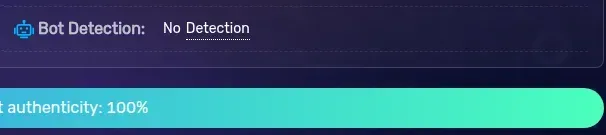 BrowserScan read Normal in that same follow-up, and this crop shows no bot detection. Brave still drew rebrowser’s useragent flag in that session. None of these readings forecasts another site.
Google Search. Fixed-port headful Chrome 154.0.8037.97 with
navigator.webdriverfalse was served from the home IP. Pipe and port-0 launches with the property true returned/sorry. The follow-up served 10 of 10 for Chrome 154, Helium 0.18.3.1 and Brave 1.96.61 through clean-browser plus Patchright. In that session, rebrowser showed 0 red on Chrome and Helium, Brotector showed 0, sannysoft showed 0 failed, browserscan read Normal, and CreepJS read 0 percent headless. Brave still drew rebrowser'suseragentflag, a quirk it also showed before. With the property fixed, those detectors read like a normal browser. Before the fix, Helium read "Robot" on CreepJS. That is what those searches and those detector pages did. It is not a model of Google's checks, and it is not a forecast for another site.Detector warnings are a second record. rebrowser flagged
sourceUrlLeakfrom Playwright's evaluate. Brotector flaggedRuntime.enable. Patchright's connection hid both. Google still served the rung that usedRuntime.enablewith the property false. A detector warning and a blocked search are different observations. The bench also recorded Cloudflare checks passed, 3 of 3, on Glassdoor, Indeed and Upwork, for all seven builds, from fixed-port launches on the home IP. Those are passed checks on those pages. They are not a Cloudflare guarantee.Unfinished checks. The noxtools Cloudflare Turnstile case still fails, and it is waiting on a clean-browser plus Patchright retest from the home IP. TLS and JA4 parity between browser forks is unmeasured. Headless with
navigator.webdriverfalse is untested. An OpenDeep note said vendors no longer key on this property. That claim does not hold for Google Search in this ablation.
Test the site you care about, on your browser version, with your launch. A served Google page still leaves the browser sitting on a machine. Cheaper model calls do not remove that cost.
11Why does the browser mode still matter if model calls are cheaper?
Because the model and the machine are moving in opposite directions. You can buy a given level of model performance for much less than in 2023. The RAM, the SSD and several cloud servers that would host the browser cost more than they did a year ago. The agent still needs a place to run, which is why an older machine stays in the plan.
Epoch AI, 22 September 2026, measured the cheapest way to hit a fixed level of performance and found the cost down about 47 percent per quarter since 2023, or 13 times per year. The rate is not one number for every task. Math benchmarks in that report fell about 50 to 52 percent per quarter. Game-style puzzles fell about 39 to 43 percent. A score that has just become the best available fell faster, about 66 percent per quarter. Two years after that debut, the same capability fell about 32 percent per quarter. One frontier example, GPQA Diamond at a 75 percent score, went from $0.30 a question on OpenAI o3, released 31 January 2025, to $0.0004 on GPT-5.6 Luna, a 725-fold drop in under 18 months. Epoch also notes that this tracks a buyer who switches to the cheapest adequate model. Many people do not switch that often.
An earlier yardstick, from Guido Appenzeller at a16z on 12 November 2024, was about 10 times cheaper per year for equivalent performance. The worked example is MMLU 42: GPT-3 at $60 per million tokens in November 2021, and Llama 3.2 3B via Together.ai at $0.06 per million tokens when that article was published. That is a 1,000-fold drop in three years, on published API price for the cheapest model that reached the score. Epoch's March 2025 cut of six benchmarks found anything from 9 times to 900 times a year, and warned that the fastest drops were the recent ones. Use 13 times a year as Epoch's 2026 central figure for a fixed level of performance. Do not read it as a 10-fold drop packed into four to six months. The sources above do not say that.
Hardware has gone the other way.
- TrendForce, 2 February 2026, raised its first-quarter 2026 contract forecast to +90 to 95 percent quarter on quarter for conventional DRAM, from an earlier +55 to 60 percent. NAND flash moved to +55 to 60 percent. PC DRAM was projected to at least double on the quarter. Enterprise SSD contract prices were projected at +53 to 58 percent. The stated pressure was AI and data-centre demand.
- Born City, 26 February 2026, reported Hetzner telling customers that RAM and SSD costs had risen 500 percent since September 2025, with price changes from 1 April 2026. The same piece noted OVH's chief executive expecting cloud prices up 5 to 10 percent in 2026.
- Hetzner's own note puts a further adjustment on new cloud orders and rescales from 15 June 2026, 08:00 CEST. Some changes to legacy-priced servers can move them onto current pricing. Bytesized Hosting reports that June step as high as 175 percent on some plans, excluding VAT and an IPv4 address, for Germany and Finland: CPX52 from EUR 36.49 to EUR 100.49 a month, CCX23 from EUR 31.49 to EUR 85.99.
- Gartner, via VnExpress on 8 March 2026, forecast DRAM and SSD prices up by as much as 130 percent by the end of 2026, and PC and laptop prices up 17 percent against 2025. IDC, via CRN Asia on 19 January 2026, expected average selling prices to rise and said vendors might ship lower memory specs to stretch supply. Neither source is a price for your particular laptop.
If you already own the machine, the browser can stay there while model calls are billed by the token. If you are pricing a new memory-heavy cloud server, those contract and list prices are the headwind. Neither path says headless is the lighter mode. We never measured that.
12Does headless Chrome use less RAM and CPU than headful?
Our tests cannot say. The 7 October 2026 bench measured headful builds only. Anchor Browser publishes a headless-versus-headful memory pair of 1,141 KB against 459 KB. A whole browser does not fit in a megabyte, so the unit is suspect. We do not use it as a saving.
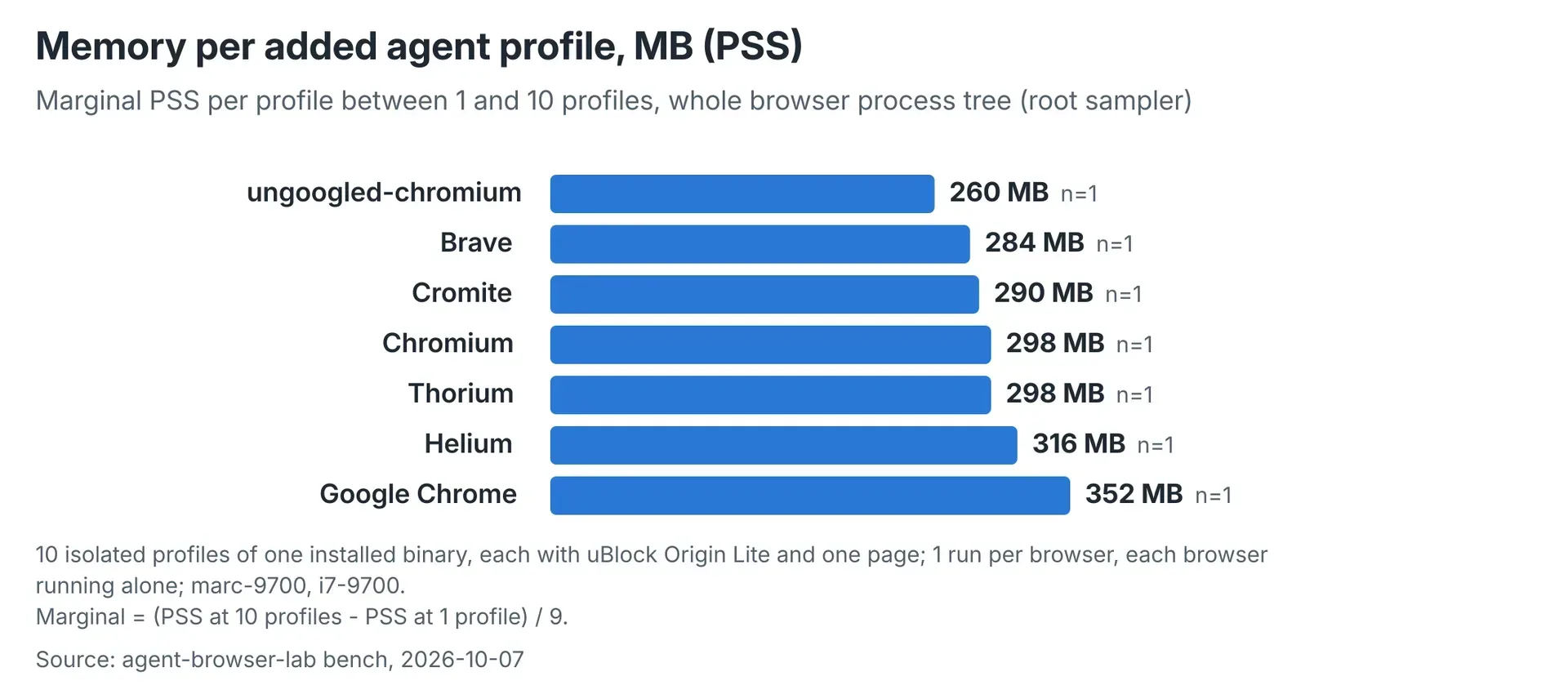 Marginal PSS is the memory of one more isolated profile, measured from 1 to 10 profiles. Every profile had uBlock Origin Lite and one page. Each browser ran alone, once, on an i7-9700. Ungoogled-chromium was 259.8 MB. Chrome was 351.5 MB. The run is headful only, so it is not a headless saving.
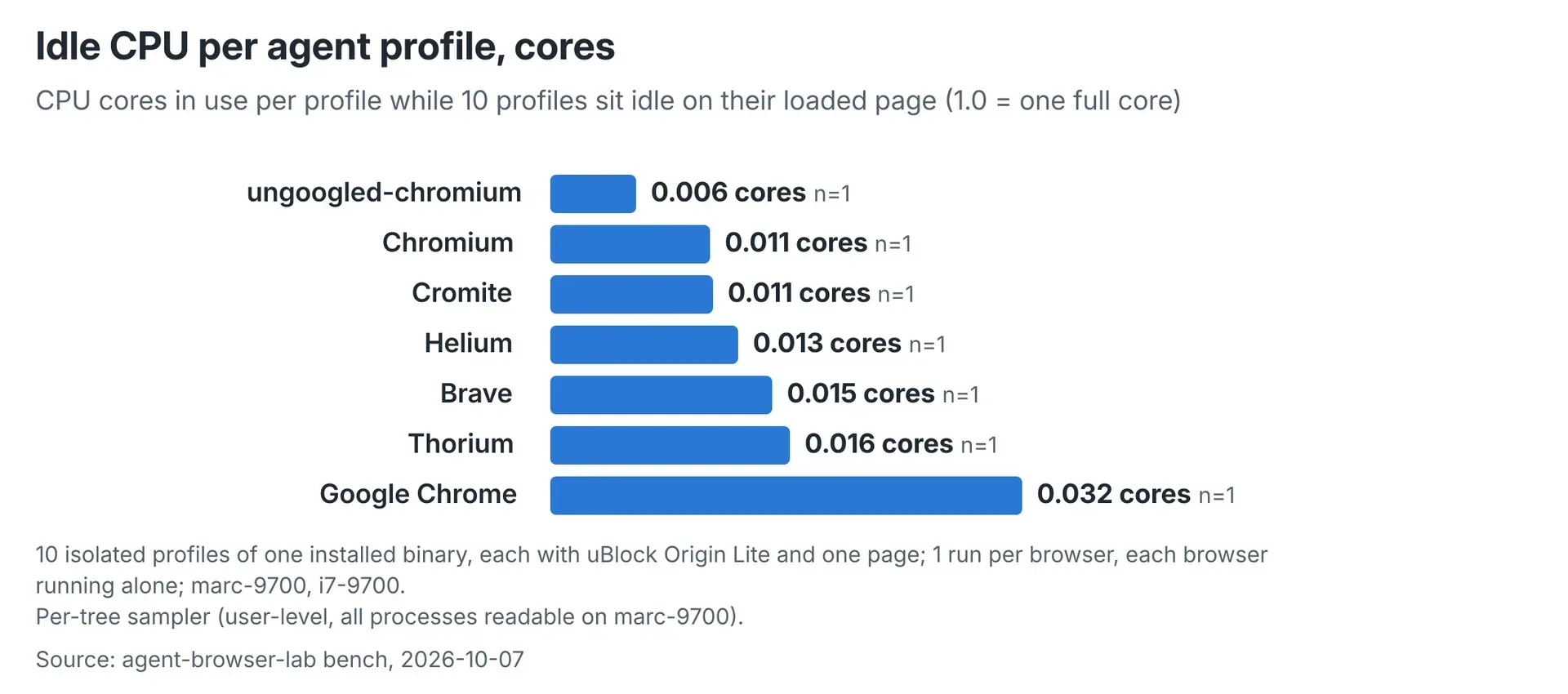 With 10 idle profiles, ungoogled-chromium used 0.0058 cores per profile and Chrome used 0.0319. The sampler is per browser tree, one run each, on the same i7-9700 setup. Idle is not the cost of loading a heavy page. Headless CPU was not measured.
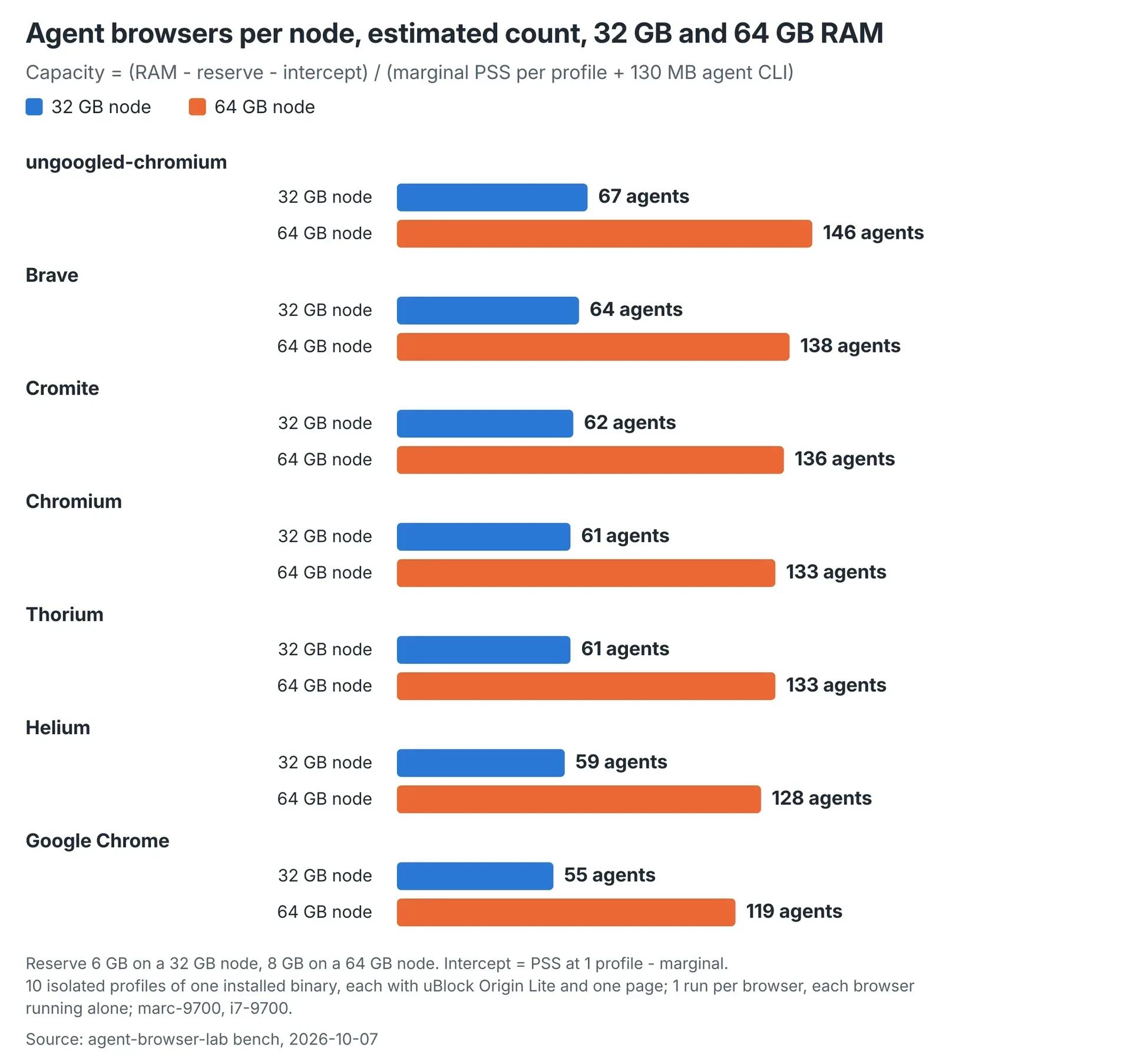 These counts are a formula, not a machine packed full. It subtracts a 6 GB reserve on 32 GB, or 8 GB on 64 GB, then divides by marginal PSS plus 130 MB for the agent process. That gives 67 ungoogled-chromium profiles or 55 Chrome profiles on 32 GB, and 146 or 119 on 64 GB. At 256 X clients the bench still stopped near 45 headful Chromium profiles.
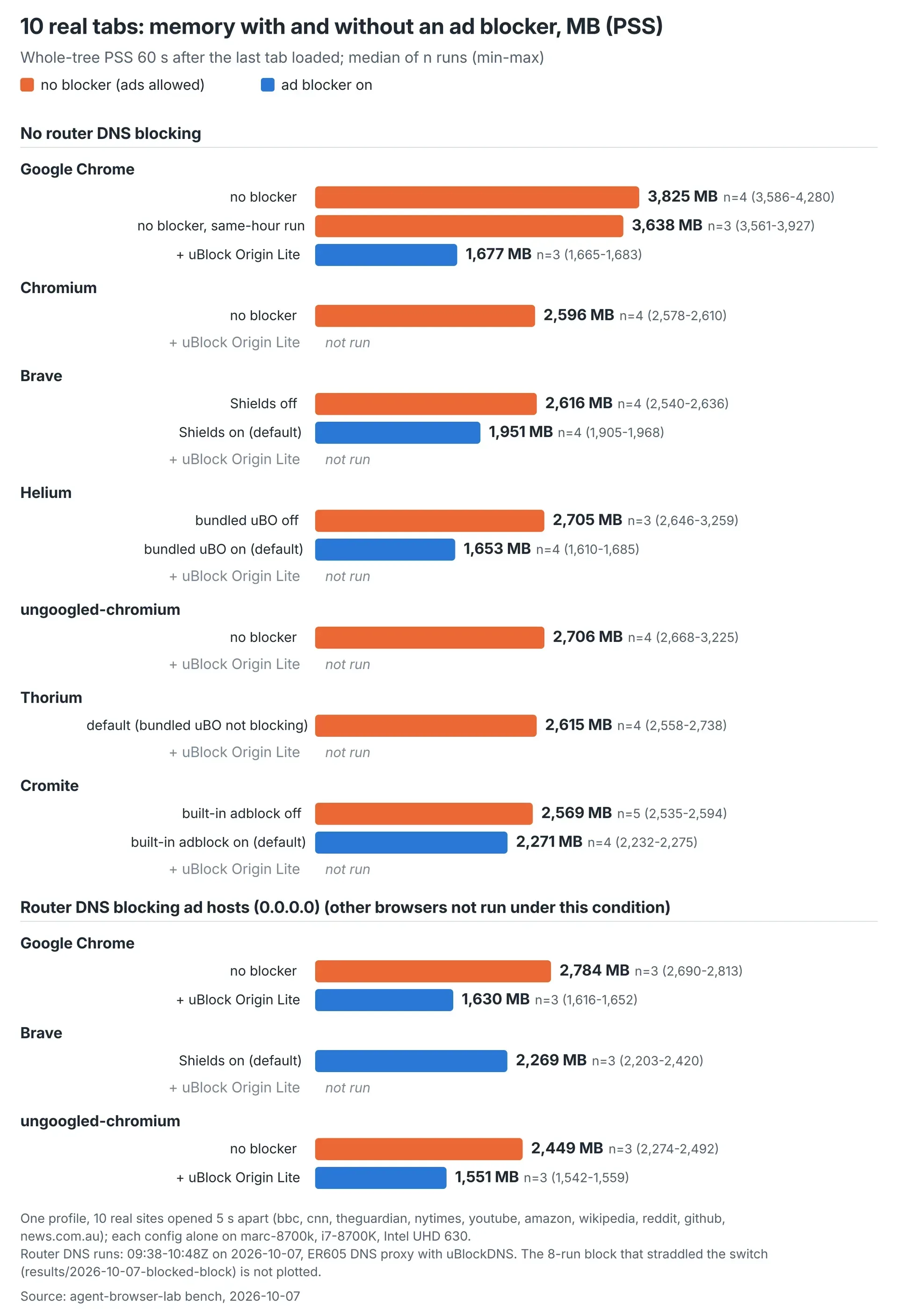 Ten real tabs are a different test from one agent profile. Whole-tree PSS 60 seconds after the last load spans about 1,551 MB to 3,825 MB in this set, depending on browser, blocker and whether the router answered ad hosts with 0.0.0.0. Do not use that span as the per-agent number. Firefox, Zen, Vivaldi and Lightpanda were not measured.
What we can put on an older machine is the headful cost of one extra agent profile. Each figure is one isolated profile, uBlock Origin Lite on, one page, each browser run alone. Marginal PSS was 260 MB for ungoogled-chromium and 352 MB for Chrome. Idle use was 0.006 cores against 0.032 cores. Those are idle figures, not the cost of loading a heavy page.
The published agent counts are a formula, not a machine we packed to the ceiling. It takes installed RAM, subtracts a reserve (6 GB on 32 GB, 8 GB on 64 GB) and divides by marginal PSS plus 130 MB for the agent process. That formula gives 67 ungoogled-chromium profiles or 55 Chrome profiles on 32 GB, and 146 or 119 on 64 GB. A default X display is a separate cap: at 256 clients our bench stopped near 45 headful Chromium profiles, about six X connections each, until -maxclients 2048. Memory room you cannot open windows for is not capacity.
A person with 10 ad-heavy tabs is a different test, about 1,550 to 3,850 MB depending on browser and blocker. Do not treat that range as the per-agent number.
Our benchmarks do not establish whether headless mode saves RAM or CPU over headful mode. The headless browser memory and CPU benchmark compares six configurations, with three runs each across ten URLs. Served content differed, and the headful ten-tab benchmark used different hardware. A same-build, same-pages comparison between modes on the same machine remains undone. For headful measurements and capacity estimates, see CPU and memory cost of running AI agents in headful browsers.
Back to Top: Headless vs headful browser: when does your AI agent need a window?