
Headless browser performance in 2026: memory and CPU measured across six browsers


- Median settled memory ranged from Lightpanda's 1,116.1 MB PSS to Firefox's 4,463.5 MB; Lightpanda also had the highest peak at 8,068.8 MB.
- ungoogled-chromium recorded the lowest loading and hold-phase CPU, and received the NYT robot-block page in every run.
- Camoufox recorded the highest median hold-phase CPU at 305.1% of one core, representing about three busy cores.
- Browsers received different content from the same ten URLs, and those content differences limit the comparison.
- A load event does not prove the expected page arrived; Lightpanda recorded ten load events in every run, yet YouTube failed each time.
Which headless browser uses the least memory when you keep ten tabs open? Lightpanda recorded the lowest settled memory in our benchmark, while ungoogled-chromium used the least CPU. What happens during loading? Lightpanda also recorded the highest memory peak, and ungoogled-chromium received the NYT robot-block page in every run.
Those content differences limit the comparison. We measured the same ten URLs as served to each browser, rather than ten identical pages.
Our headless browser benchmark covered six configurations, with three runs each on one 32 GB machine. All 18 runs appear below, alongside their ranges and independent checks. We tested one browser at a time, so these figures do not establish a safe server worker count.
1Which configuration used the least memory and CPU?
Lightpanda recorded the lowest settled memory; ungoogled-chromium recorded the lowest loading and hold-phase CPU. These results apply to the content each configuration received.
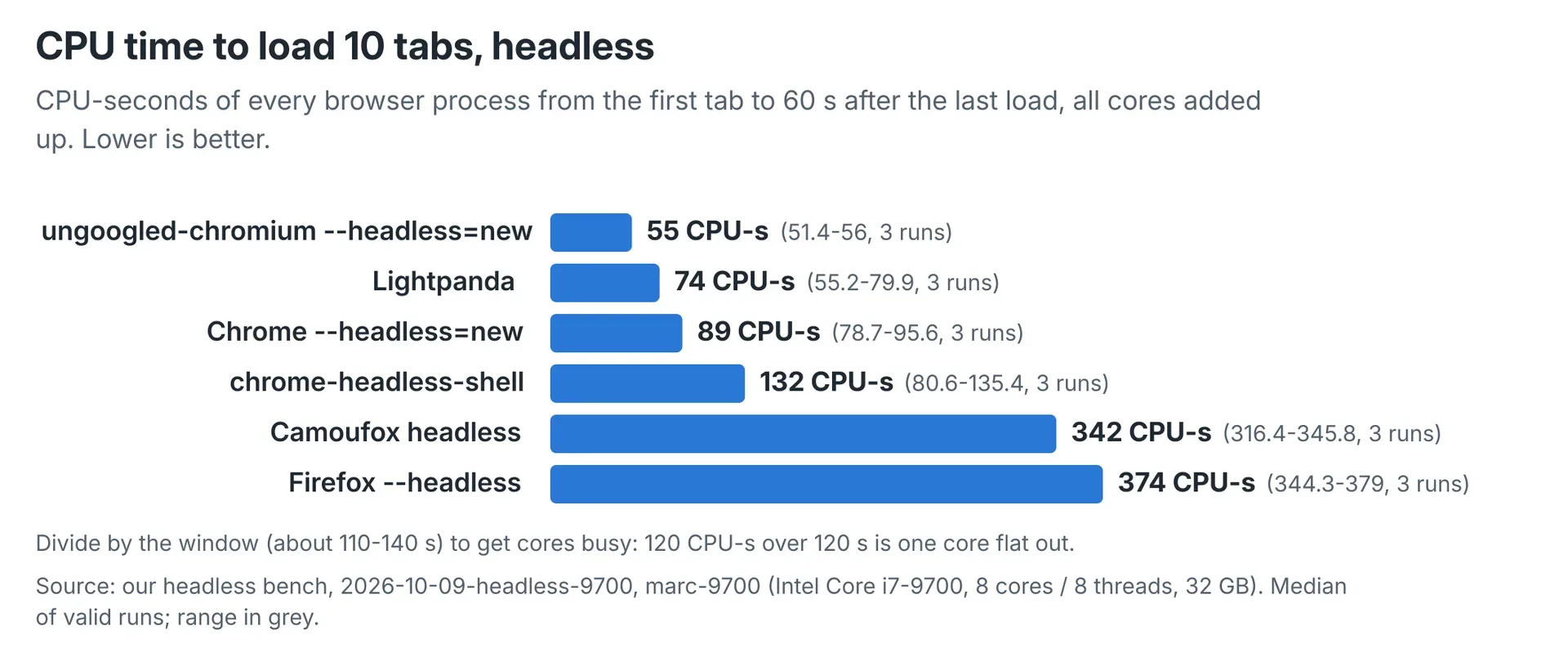 ungoogled-chromium recorded the lowest median load CPU at 55.2 CPU-seconds. Values are medians of three runs. Each configuration received different content from the same ten URLs.
The workload opened BBC, CNN, The Guardian, The New York Times, YouTube, Amazon, Wikipedia’s Australia article, Reddit, GitHub and news.com.au. Each site occupied one tab.
Memory figures use PSS, measured across the benchmark browser’s process tree. They exclude other applications on the machine. “At settle” means the first sample at least 60 seconds after the last load event.
Lightpanda’s low settled memory came with the highest loading peak. The table shows medians from three valid runs, with minimum and maximum values in brackets, ordered by settled memory.
| Configuration | PSS at settle, MB | Peak PSS, MB | CPU-seconds, first tab to settle | Idle CPU, % of one core | Load events within 30 s, out of 10 |
|---|---|---|---|---|---|
| Lightpanda 1.0.0 | 1,116.1 (814.8-1,118.3) | 8,068.8 (8,025.1-8,614.4) | 73.9 (55.2-79.9) | 22.5 (3.9-23.1) | 10 (10-10) |
| ungoogled-chromium 154.0.8037.97 | 1,606.5 (1,436.9-1,634.5) | 1,972.6 (1,819.3-2,085.1) | 55.2 (51.4-56.0) | 3.2 (2.8-3.4) | 10 (9-10) |
| chrome-headless-shell 154.0.8037.97 | 1,801.3 (1,500.8-1,841.4) | 2,322.7 (1,777.3-2,368.6) | 131.6 (80.6-135.4) | 70.0 (21.0-70.3) | 9 (9-10) |
Chrome --headless=new 154.0.8037.97 |
2,055.7 (1,739.5-2,088.8) | 2,455.8 (2,177.0-2,625.4) | 89.3 (78.7-95.6) | 7.2 (4.5-14.5) | 9 (9-10) |
| Camoufox 156.0.1-beta.36 | 3,061.6 (3,031.6-3,430.0) | 3,239.0 (3,156.9-3,637.8) | 342.1 (316.4-345.8) | 305.1 (283.9-310.3) | 10 (10-10) |
Firefox --headless 157.0.1 |
4,463.5 (4,343.1-4,469.9) | 5,455.7 (5,447.3-5,543.0) | 373.6 (344.3-379.0) | 172.4 (132.0-173.8) | 8 (8-8) |
“Idle CPU” measures the two-minute hold after settling. Its percentage is a share of one core: 100% means one fully busy core. Camoufox’s 305.1% therefore represents about three cores busy on average.
ungoogled-chromium had the lowest settled memory among the full Chromium builds. Its three runs all received the NYT robot-block page; Chrome --headless=new received the home page twice.
Firefox received nine full pages per run, compared with Chrome’s five to seven. CNN and news.com.au missed Firefox’s load-event deadline but still rendered. Their memory and CPU remain inside its figures.
Camoufox retained its bundled uBlock Origin at the shipped default. No additional ad blocker was installed for any configuration. It recorded 13 ad requests per run, compared with 32-222 across the others.
A load event does not prove that the expected page arrived. Lightpanda recorded ten load events in every run, yet YouTube failed each time. Browser settings and served content both belong beside the resource figures.
2What is chrome-headless-shell, and which browser do automation tools launch?
chrome-headless-shell is Chrome’s standalone old headless implementation; automation tools can select it or Chrome’s unified headless mode.
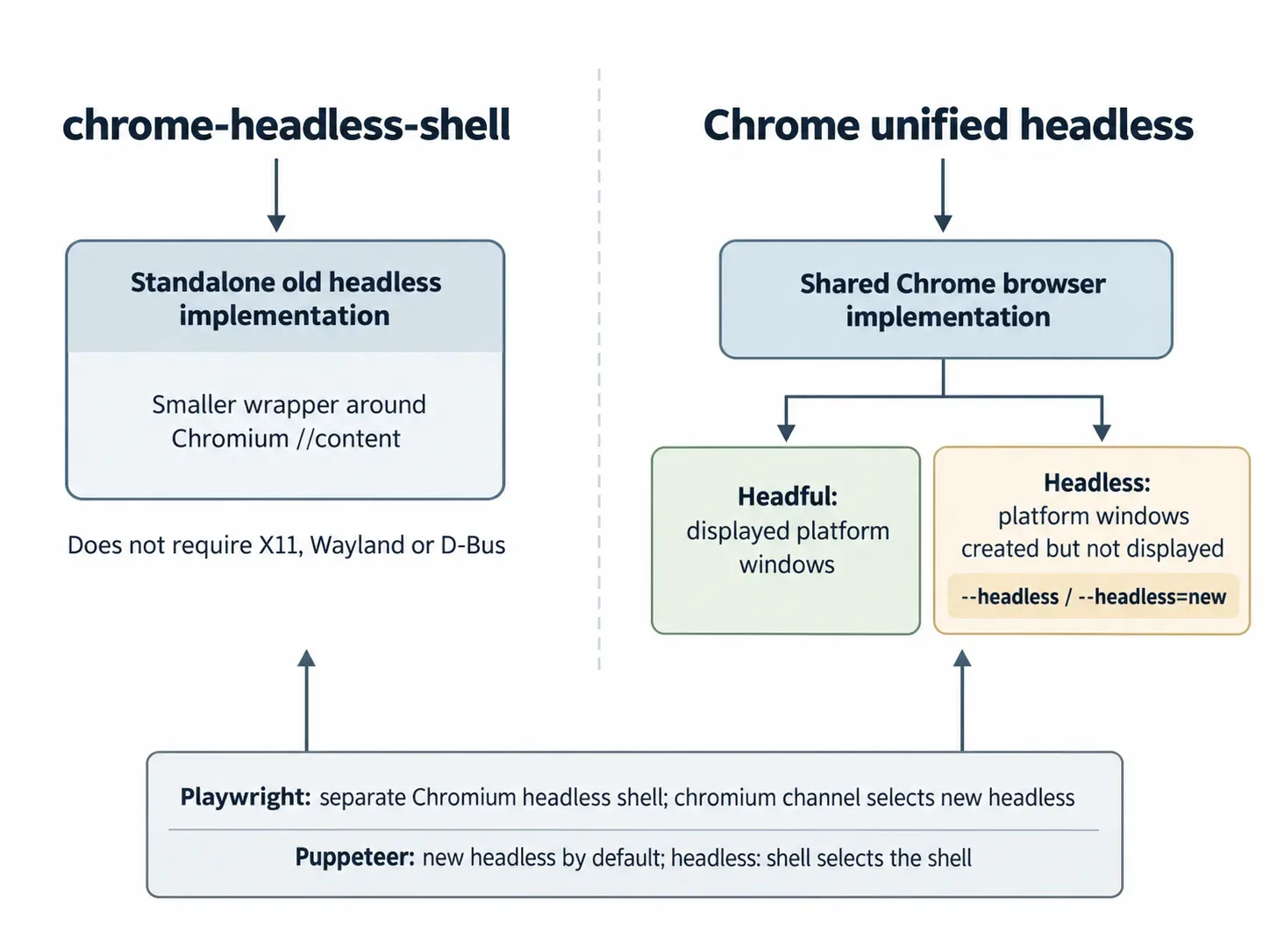
Since Chrome 132.0.6793.0, old headless has been available only through the separate shell binary. Google describes the shell as a wrapper around Chromium’s //content module, with fewer dependencies. It does not require X11, Wayland or D-Bus, and Chrome for Testing publishes its builds. See Google’s explanation of chrome-headless-shell.
Chrome’s --headless and --headless=new switches run unified headless mode. Since Chrome 112, this mode creates platform windows without displaying them. It shares the Chrome browser implementation with headful mode, according to Chrome’s headless documentation.
Playwright’s documentation describes a separate Chromium headless shell for headless operation. Selecting the chromium channel opts into new headless. Puppeteer defaults to new headless; headless: 'shell' selects the shell. See Playwright’s browser guide and Puppeteer’s headless guide.
The benchmark measured these specific binaries and launch settings, rather than automation tools as interchangeable browser choices.
| Configuration | Binary and version | Headless setting | Driver |
|---|---|---|---|
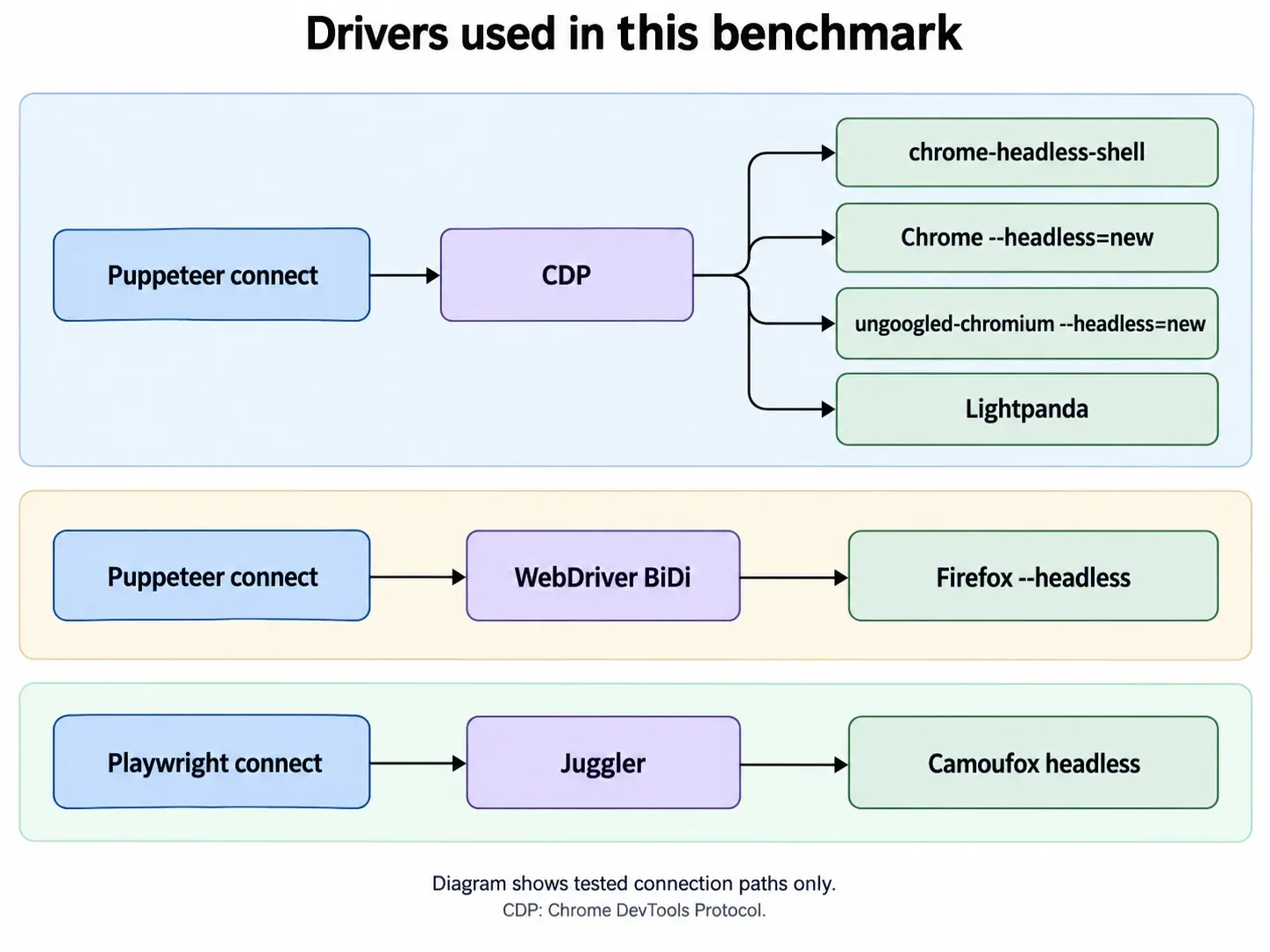
| chrome-headless-shell | chrome-headless-shell 154.0.8037.97, Chrome for Testing | Always headless | Puppeteer connect, CDP |
Chrome --headless=new |
Google Chrome 154.0.8037.97 | --headless=new |
Puppeteer connect, CDP |
| ungoogled-chromium | ungoogled-chromium 154.0.8037.97 | --headless=new |
Puppeteer connect, CDP |
Firefox --headless |
Firefox 157.0.1 | --headless and MOZ_HEADLESS=1 |
Puppeteer connect, WebDriver BiDi |
| Camoufox | Camoufox 156.0.1-beta.36, Python package 0.5.8 | launch_options(headless=True) |
Playwright connect, Juggler |
| Lightpanda | Lightpanda 1.0.0 | Always headless, no graphical renderer | Puppeteer connect, CDP |
Lightpanda’s user agent reported Chrome/124.0.6367.29. Its tested product version was Lightpanda 1.0.0.
3How did we measure headless browser memory usage and CPU?
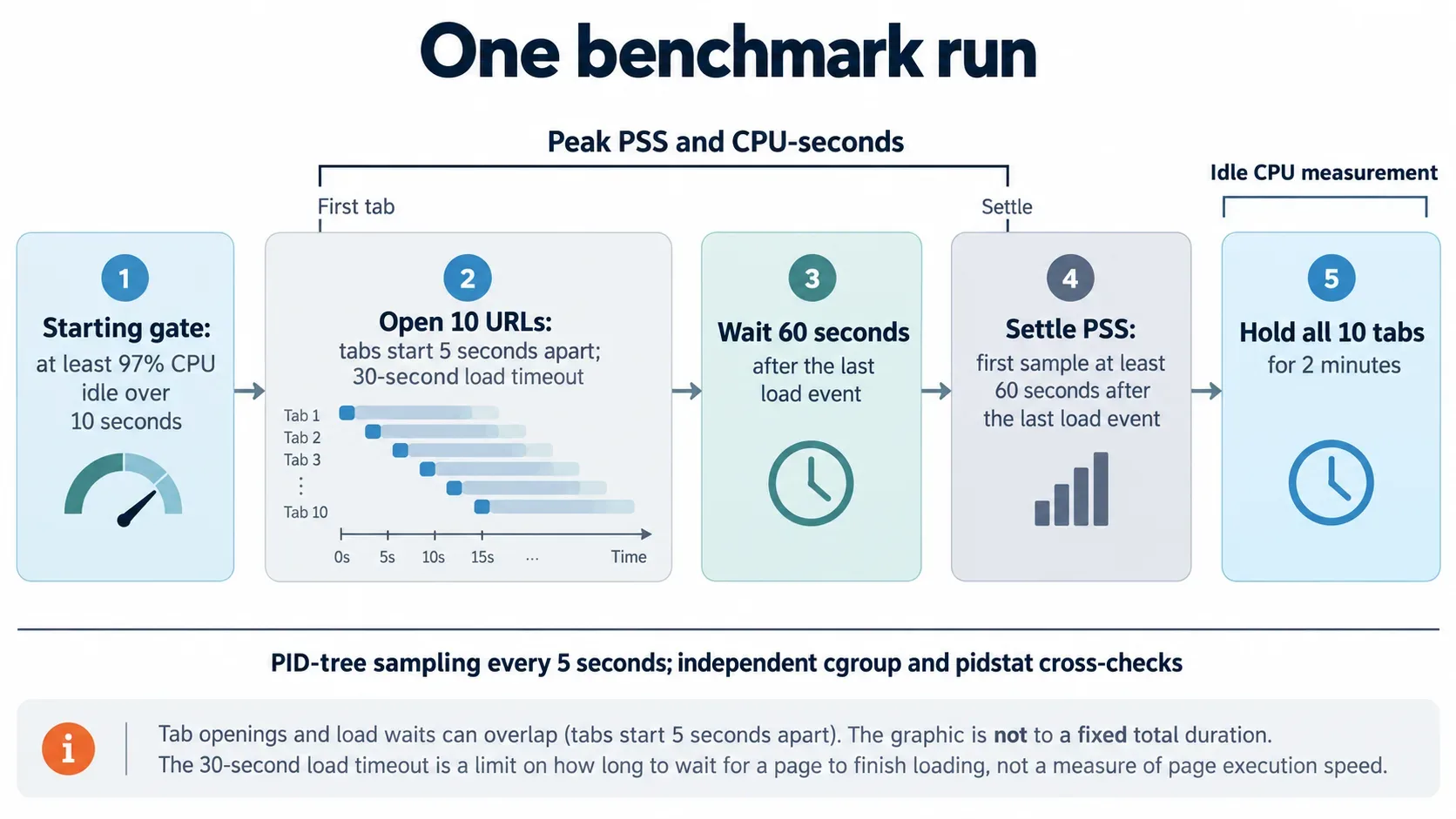
We sampled each browser’s process tree every five seconds and checked it against two independent samplers. All results come from run 2026-10-09-headless-9700, conducted on 9 October 2026.
The machine, marc-9700, had an Intel Core i7-9700, eight cores, eight threads and 32 GB RAM. It ran Debian 13, kernel 6.12, through a home IP.
An earlier headless attempt began on marc-8700k at 21:01 AWST on 8 October. That machine became unreachable around 22:30, mid-run. None of its repetitions appear here.
The protocol used consistent timing and fresh profiles across configurations.
- Each run required at least 97% CPU idle over ten seconds, with a five-minute waiting cap. The harness then ran
sync; echo 3 > /proc/sys/vm/drop_caches. Recorded starting idle levels were 97-99%. - Tabs opened five seconds apart in the same URL order, with a 30-second load timeout. The harness waited 60 seconds after the last load event, then held all ten tabs for two minutes.
- Each run used shipped defaults, a fresh profile and a fixed debugging port. Camoufox retained its bundled uBlock Origin.
- Repetition one followed configuration order, repetition two reversed it, and repetition three interleaved configurations.
- A valid run required at least eight load events, no swap use and readable browser processes at settle. All 18 runs passed on the first attempt.
- The primary PID-tree sampler read PSS, USS and RSS from
/proc/<pid>/smaps_rollup. CPU time came from/proc/<pid>/stat, including reaped children. Camoufox’s launch server was excluded.
The cgroup cross-check covered the run’s systemd scope and browser processes that moved outside it. CPU readings came from cpu.stat. The pidstat cross-check measured per-process CPU for the same PID tree.
Peak PSS is the highest five-second sample from the first tab to settle. CPU-seconds cover that interval, summed across cores. Idle CPU covers the subsequent two-minute hold.
A separate agent Chrome stayed open throughout the benchmark. At each starting gate, it used 0.0-1.0% of one core and 1,116 MB RSS across 13 processes. Those measurements were logged separately, and its processes are excluded from every result below.
4How much memory did ten tabs hold, and how high did loading peaks reach?
Median settled memory ranged from Lightpanda’s 1,116.1 MB PSS to Firefox’s 4,463.5 MB. Lightpanda had the highest loading peak.
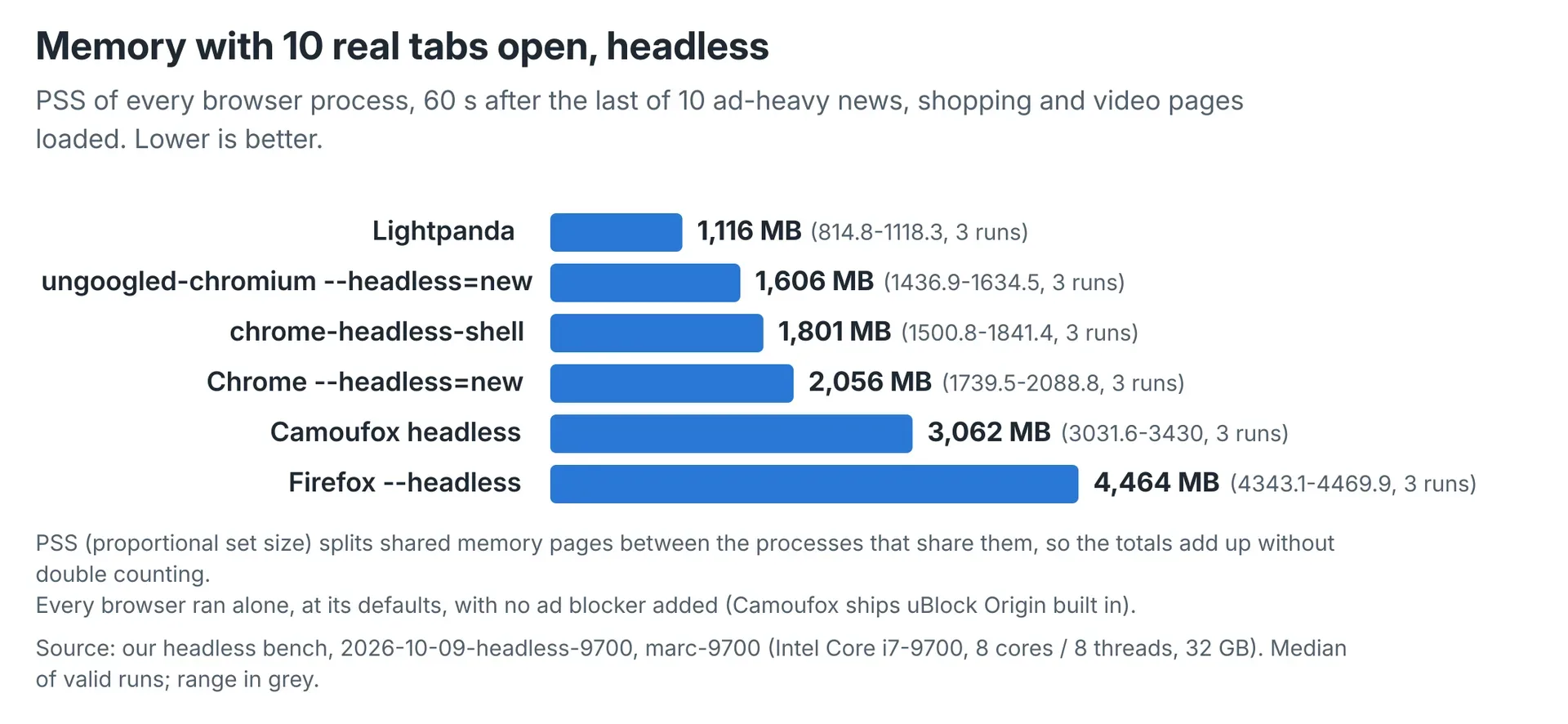 Lightpanda recorded the lowest settled memory. PSS was sampled at least 60 seconds after the last load event; each median represents three runs.
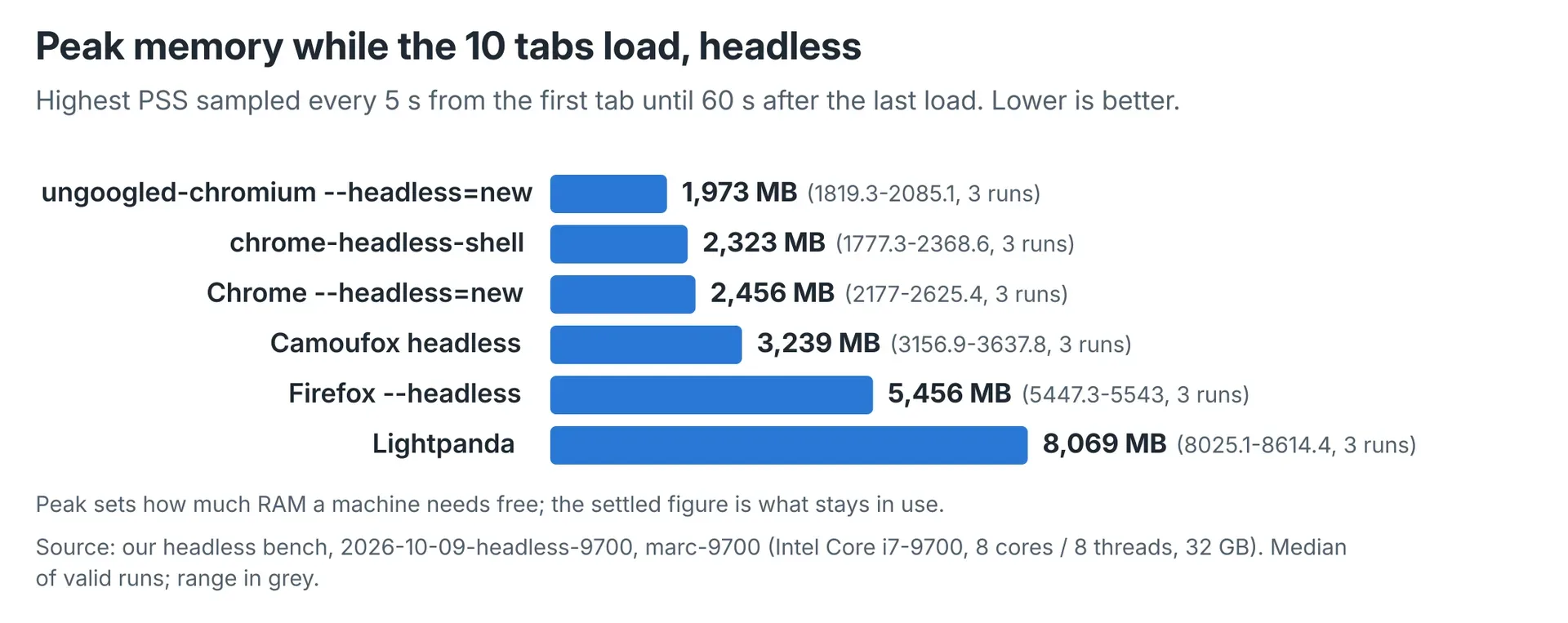 Loading peaks changed the memory ranking. Lightpanda’s median peak was 8,068.8 MB PSS, compared with 1,972.6 MB for ungoogled-chromium.
Its single process reached 8,025.1-8,614.4 MB PSS across the three runs. By the next five-second sample, it had fallen to approximately 914-1,252 MB. That sample fell between one second before and twelve seconds after the last page’s load event, depending on the repetition.
At settle, Lightpanda held approximately 815-1,118 MB. The cgroup sampler independently recorded loading peaks of approximately 8,015-8,604 MB.
Repetition one shows the climb. Five-second samples from the first tab recorded 16, 175, 417, 507, 824, 994, 2,454, 3,974, 5,482, 6,134, 8,065, 8,614 and then 1,177 MB PSS.
The configurations also differed in process count and recorded load duration. These values are medians with full ranges; USS is the additional memory metric recorded by the sampler.
| Configuration | USS, MB | Browser processes | Recorded load duration, s |
|---|---|---|---|
| Lightpanda | 1,112.3 (810.9-1,114.4) | 1 (1-1) | 48.5 (48.3-61.3) |
| ungoogled-chromium | 1,330.8 (1,166.1-1,359.7) | 43 (29-44) | 45.7 (45.7-45.7) |
| chrome-headless-shell | 1,514.2 (1,236.4-1,546.6) | 17 (17-17) | 45.5 (45.5-45.5) |
Chrome --headless=new |
1,762.7 (1,464.6-1,793.5) | 55 (54-55) | 45.7 (45.7-60.3) |
| Camoufox | 2,666.7 (2,619.5-3,008.2) | 14 (14-14) | 49.1 (49.1-49.2) |
Firefox --headless |
4,237.4 (4,112.9-4,238.4) | 77 (76-77) | 78.7 (78.2-78.8) |
These measurements cover one browser holding ten tabs. CPU readings provide a separate part of that workload’s resource cost.
5How much CPU remained busy after loading?
Camoufox recorded the highest median hold-phase CPU, at 305.1% of one core. Firefox recorded 172.4%; ungoogled-chromium recorded the lowest, at 3.2%.
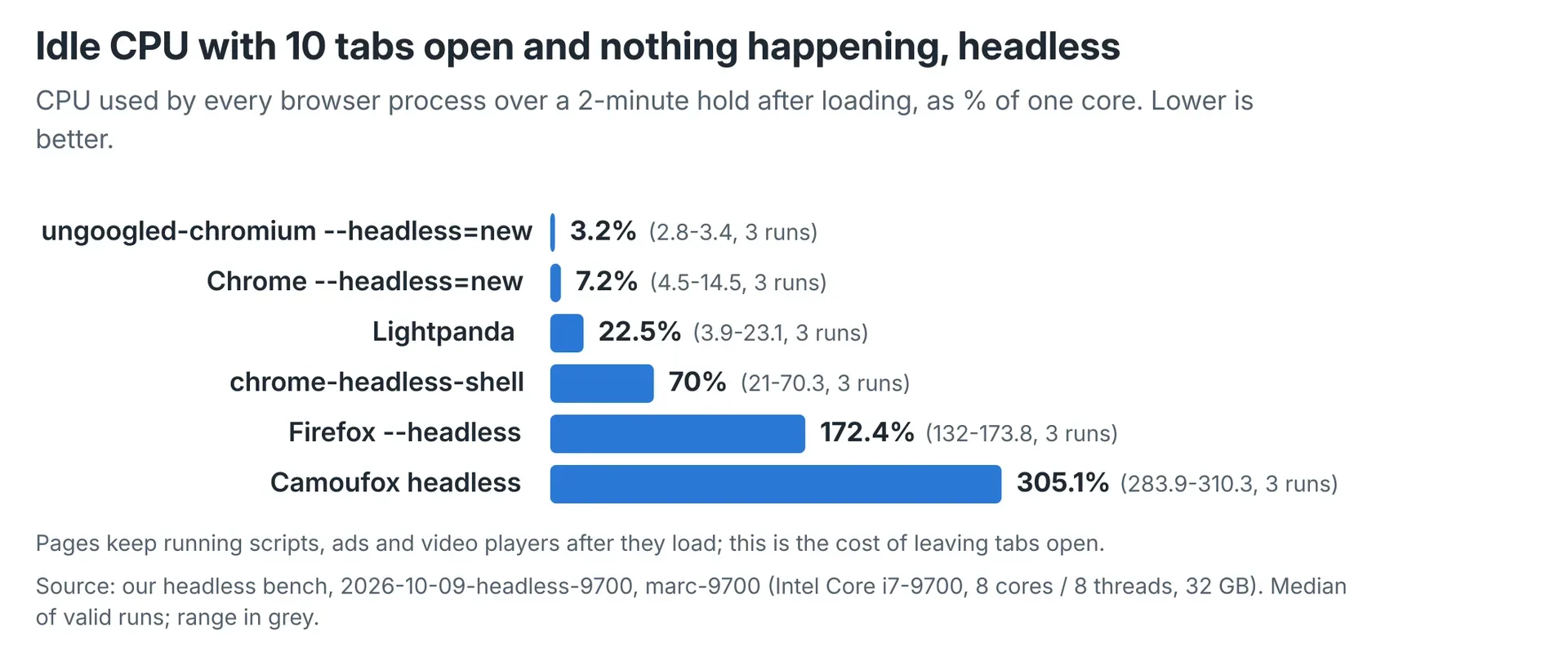 The hold phase continued to consume CPU. Here, 100% means one fully busy core; Camoufox’s 305.1% median represents about three busy cores.
Camoufox’s RDD media-decoder process used 174-193% of one core, and its main process used 72-83%. Firefox’s main process used about 48%, its RDD process 17-46%, and one content process about 30%.
The benchmark reported agreement within its tolerance on every run, with no flags. The table preserves the measured differences between samplers, including Camoufox’s loading CPU readings.
| Configuration | PSS, MB: PID tree / cgroup | Idle CPU, % of one core: PID tree / cgroup / pidstat | Load CPU-seconds: PID tree / cgroup |
|---|---|---|---|
| Lightpanda | 1,116.1 / 1,115.7 | 22.5 / 22.5 / 22.5 | 73.9 / 73.8 |
| chrome-headless-shell | 1,801.3 / 1,801.2 | 70.0 / 70.0 / 70.1 | 131.6 / 131.7 |
Chrome --headless=new |
2,055.7 / 2,057.0 | 7.2 / 7.2 / 6.8 | 89.3 / 89.8 |
| ungoogled-chromium | 1,606.5 / 1,573.9 | 3.2 / 3.1 / 2.7 | 55.2 / 55.8 |
Firefox --headless |
4,463.5 / 4,463.9 | 172.4 / 170.8 / 171.2 | 373.6 / 373.6 |
| Camoufox | 3,061.6 / 3,061.4 | 305.1 / 303.4 / 303.7 | 342.1 / 360.2 |
Lightpanda used fewer CPU-seconds than Chrome during loading, but more CPU during the hold. The shell used less settled memory than full Chrome, yet more CPU in both phases.
6chrome-headless-shell vs Chrome: did lower memory also mean lower CPU?
chrome-headless-shell used less settled memory than Chrome --headless=new, but more loading and hold-phase CPU. Both binaries were version 154.0.8037.97.
The shell’s medians were 1,801.3 MB settled PSS, 131.6 CPU-seconds to settle and 70.0% idle CPU. Chrome recorded 2,055.7 MB, 89.3 CPU-seconds and 7.2%, respectively.
NYT content varied between repetitions. The shell received the robot page in repetition three; Chrome received it in repetition one. These were also each configuration’s lowest loading CPU readings.
The runs that received the NYT home page retained the same direction of difference.
| Metric | Shell repetitions 1-2 | Chrome repetitions 2-3 |
|---|---|---|
| PSS at settle, MB | 1,801.3-1,841.4 | 2,055.7-2,088.8 |
| CPU-seconds, first tab to settle | 131.6-135.4 | 89.3-95.6 |
| Idle CPU, % of one core | 70.0-70.3 | 4.5-14.5 |
Matching the NYT response does not establish identical content across all ten tabs. Recorded load-duration medians were close, at 45.5 seconds for the shell and 45.7 for Chrome. Tabs opened five seconds apart, so these timings do not establish a general automation speed ranking.
7Was headless Firefox lighter than headless Chrome?
Firefox used more memory than Chrome --headless=new in this benchmark, while receiving more full pages. Settled medians were 4,463.5 MB PSS for Firefox and 2,055.7 MB for Chrome.
CNN served Chrome a 13-character error page; Firefox rendered about 8,000 characters. news.com.au served Chrome a 999-character crawler-block page; Firefox rendered about 14,800 characters. Both Firefox pages missed the 30-second load-event deadline.
Reddit returned 11,175-14,032 characters to Firefox, compared with Chrome’s 240-character humanity-check page. Amazon returned 5,225 characters to Chrome and a 146-character shopping interstitial to Firefox.
Firefox’s loading CPU median was 373.6 CPU-seconds, compared with Chrome’s 89.3. The readings cover the interval through settle, including timeout waits. This comparison cannot separate engine cost from the cost of the different content received.
8How did Lightpanda compare with its published memory and speed claims?
Lightpanda’s published claims describe a different experiment from our ten-tab benchmark. Its README claims 16 times less memory and nine times faster execution than Chromium.
Our settled medians were 1,116.1 MB PSS for Lightpanda and 2,055.7 MB for Chrome. Peak medians were 8,068.8 MB and 2,455.8 MB, respectively.
Lightpanda used 73.9 CPU-seconds through settle; Chrome used 89.3. Recorded load durations were 48.5 seconds and 45.7 seconds under our fixed tab-opening schedule.
The vendor’s benchmark notes describe 933 URLs and a Go crawler using chromedp. They specify Chrome 143.0.7499.169 and memory measured with smem.
The supplied README and benchmark notes differ on hardware and headline labels. Both records are preserved here.
| Detail | Lightpanda README | Published benchmark notes |
|---|---|---|
| AWS instance | m5.large | m5.xlarge |
| Headline memory row | Labelled “peak, 100 pages”: 123 MB for Lightpanda, 2 GB for Chrome | 25-process Lightpanda row: 123.0M; 25-tab Chrome row: 2.0G |
| Headline execution row | Labelled “100 pages”: 5 s for Lightpanda, 46 s for Chrome | 25-process Lightpanda row: 0:04.81; 25-tab Chrome row: 0:46.70 |
| 100-unit rows | Not the figures used in the headline table | Lightpanda: 410.2M and 0:05.23; Chrome: 4.2G and 1:09:37 |
The supplied records do not resolve those differences. Our experiment held ten tabs open in one Lightpanda process and did not reproduce the vendor’s crawler experiment.
9Can Lightpanda run JavaScript, and did the expected pages arrive?
Lightpanda supports JavaScript through V8, but our runs did not receive the expected content from every target.
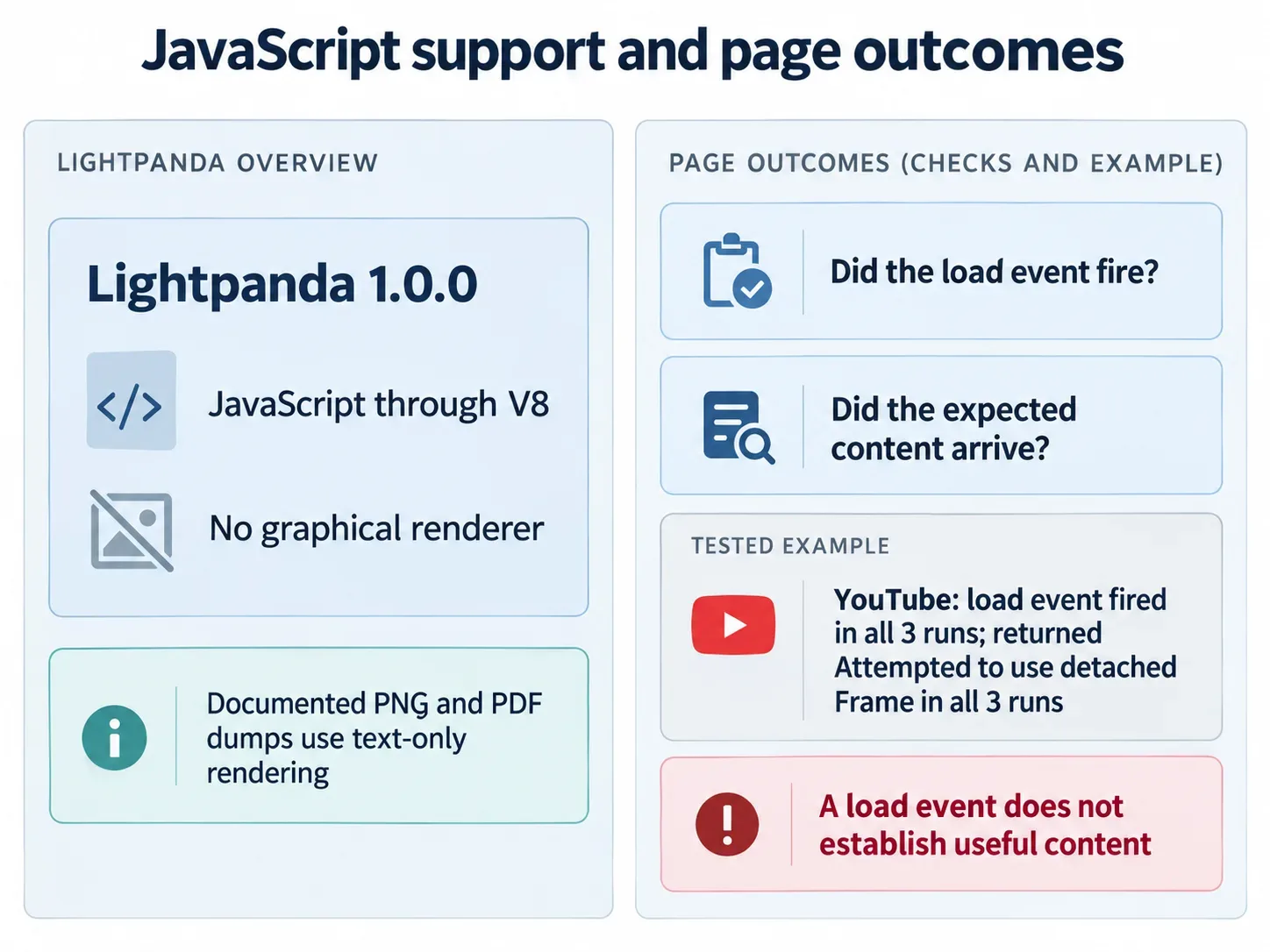
Its product page specifies no graphical rendering. The README describes PNG and PDF dump options that produce text-only rendering.
Our records classified seven targets as full pages in every Lightpanda run: BBC, CNN, The Guardian, Wikipedia’s Australia article, Reddit, GitHub and news.com.au.
YouTube failed in all three repetitions with Attempted to use detached Frame. NYT returned 20,000 characters in repetitions one and two, then its zero-character robot page in repetition three.
Amazon returned 4,246-4,299 characters on 27-29 requests in the first two repetitions. In repetition three, it returned 411 characters on 15 requests.
All ten load events were recorded in every repetition. Those events do not establish general JavaScript compatibility or successful retrieval of the expected content.
10Why did some repetitions differ so much?
Served-content changes explain the reviewed drops for chrome-headless-shell and Lightpanda. Both received the NYT robot page in repetition three, replacing the home page. Lightpanda also received the thinner Amazon page.
The shell’s settled PSS fell to 1,500.8 MB from 1,801.3-1,841.4 MB. Idle CPU fell to 21.0% from 70.0-70.3%.
In its first two repetitions, one renderer used about 38% of a core and approximately 318 MB PSS. That renderer was absent in repetition three. The busiest remaining renderer used 11%.
Lightpanda’s settled PSS fell to 814.8 MB from 1,116.1-1,118.3 MB. Idle CPU fell to 3.9% from 22.5-23.1%. Its repetition-three peak, 8,068.8 MB, remained within the other runs’ peak range.
At both starting gates, background agent Chrome used 0.0% of one core. Both gates recorded 99% CPU idle.
NYT served its robot page in eight runs across five configurations. These were shell repetition three, Chrome repetition one, all ungoogled-chromium runs, Camoufox repetitions two and three, and Lightpanda repetition three. Firefox received the home page in all three.
The review found no pattern by repetition or configuration order and retained the runs without a rerun.
Other content differences persisted. All three Chromium configurations received CNN’s error page and news.com.au’s crawler-block page. Firefox and Camoufox received Amazon’s shopping interstitial in every repetition.
Full-page counts differed even when load events fired. The benchmark counted YouTube’s normal signed-out home as a full page.
| Configuration | Full pages per run | Load-event timeouts |
|---|---|---|
| chrome-headless-shell | 6-7 | The Guardian, repetitions 1-2 |
Chrome --headless=new |
5-7 | Wikipedia, repetition 1; The Guardian, repetition 2 |
| ungoogled-chromium | 6 | The Guardian, repetition 2 |
Firefox --headless |
9 | CNN and news.com.au, all repetitions |
| Camoufox | 8-9 | None |
| Lightpanda | 7-9 | None; YouTube returned an error every time |
11Every run and its independent cross-checks
All 18 runs passed the validity rule on their first attempt. Each repetition’s measurements appear below, including load-event and ad-request counts.
Memory columns are in MB, and CPU percentages are shares of one core. CPU-seconds cover the first tab through settle; idle readings cover the two-minute hold.
| Configuration | Rep | PSS at settle, MB | Peak PSS, MB | CPU-seconds to settle | Idle CPU, % | cgroup PSS, MB | cgroup idle, % | pidstat idle, % | Load events, out of 10 | Ad requests |
|---|---|---|---|---|---|---|---|---|---|---|
| Lightpanda | 1 | 1118.3 | 8614.4 | 79.9 | 22.5 | 1118.3 | 22.5 | 22.5 | 10 | 209 |
| Lightpanda | 2 | 1116.1 | 8025.1 | 73.9 | 23.1 | 1115.7 | 23.1 | 23.1 | 10 | 222 |
| Lightpanda | 3 | 814.8 | 8068.8 | 55.2 | 3.9 | 814.7 | 3.9 | 3.9 | 10 | 204 |
| chrome-headless-shell | 1 | 1841.4 | 2368.6 | 135.4 | 70.3 | 1841.6 | 70.3 | 70.8 | 9 | 50 |
| chrome-headless-shell | 2 | 1801.3 | 2322.7 | 131.6 | 70.0 | 1801.2 | 70.0 | 70.1 | 9 | 50 |
| chrome-headless-shell | 3 | 1500.8 | 1777.3 | 80.6 | 21.0 | 1500.8 | 21.0 | 21.0 | 10 | 46 |
Chrome --headless=new |
1 | 1739.5 | 2177.0 | 78.7 | 7.2 | 1740.6 | 7.2 | 6.8 | 9 | 40 |
Chrome --headless=new |
2 | 2088.8 | 2625.4 | 95.6 | 14.5 | 2090.5 | 14.5 | 14.1 | 9 | 45 |
Chrome --headless=new |
3 | 2055.7 | 2455.8 | 89.3 | 4.5 | 2057.0 | 4.4 | 4.4 | 10 | 44 |
| ungoogled-chromium | 1 | 1634.5 | 2085.1 | 56.0 | 3.4 | 1636.3 | 3.5 | 3.1 | 10 | 45 |
| ungoogled-chromium | 2 | 1436.9 | 1819.3 | 51.4 | 2.8 | 1438.6 | 2.8 | 2.2 | 9 | 32 |
| ungoogled-chromium | 3 | 1606.5 | 1972.6 | 55.2 | 3.2 | 1573.9 | 3.1 | 2.7 | 10 | 42 |
Firefox --headless |
1 | 4463.5 | 5455.7 | 379.0 | 173.8 | 4463.9 | 171.9 | 171.9 | 8 | 175 |
Firefox --headless |
2 | 4343.1 | 5447.3 | 344.3 | 132.0 | 4344.9 | 133.4 | 131.7 | 8 | 165 |
Firefox --headless |
3 | 4469.9 | 5543.0 | 373.6 | 172.4 | 4470.5 | 170.8 | 171.2 | 8 | 170 |
| Camoufox | 1 | 3430.0 | 3637.8 | 342.1 | 305.1 | 3425.9 | 303.4 | 303.7 | 10 | 13 |
| Camoufox | 2 | 3061.6 | 3156.9 | 316.4 | 283.9 | 3061.4 | 284.1 | 284.4 | 10 | 13 |
| Camoufox | 3 | 3031.6 | 3239.0 | 345.8 | 310.3 | 3025.0 | 309.7 | 310.4 | 10 | 13 |
12What can this benchmark tell you about server capacity?
This benchmark measures single-browser resource use; it does not establish a worker count or throughput limit. Each configuration ran alone and held its tabs for two minutes.
Server sizing requires evidence beyond these runs.
- Concurrent browsers loading or holding pages together were not tested.
- Hours-long sessions and behaviour under memory pressure were not tested. Valid runs used no swap.
- Container memory and shared-memory limits were not tested.
- The page records show what arrived, without establishing whether headless mode caused a block response. That question needs a headful control on the same machine.
Our headful ten-tab benchmark ran on marc-8700k, an i7-8700K with six cores and twelve threads. This headless benchmark used marc-9700, an i7-9700 with eight cores and eight threads. Differences between their results combine browser mode and hardware.
The headless vs headful browser article covers the mode discussion. The headful browser CPU and memory article contains that benchmark’s results.
Back to Top: Headless browser performance in 2026: memory and CPU measured across six browsers