
Running AI agents in a headful browser: measured CPU and memory costs


- Each extra isolated headful profile added 260 to 352 MB of browser memory in our agent-pattern test, with ungoogled-chromium lowest and Chrome highest.
- Our memory model projects 67 ungoogled-chromium agents or 55 Chrome agents on 32 GB, including a command-line allowance; these are estimates, not demonstrated limits.
- Plain Chrome averaged 101% idle CPU across ten untouched tabs, while Chrome with uBlock Origin Lite averaged 12% in later runs.
- Under router DNS blocking, a CNN script produced 430,000 to 795,000 failed requests in about four minutes, keeping 2 to 2.6 CPU cores busy.
- The results favour ungoogled-chromium with uBlock Origin Lite for our Linux agents, and Chrome with the same extension for people.
Want to run browser agents on the computer you already own? In our test, ungoogled-chromium with uBlock Origin Lite used the least memory per extra isolated headful profile.
How many agents could that support? Our memory model projects 67 ungoogled-chromium agents or 55 Chrome agents on 32 GB, including a command-line allowance. These are capacity estimates, not demonstrated limits for agents completing tasks simultaneously.
Would those browsers receive the pages they need? We also tested launch settings against Google Search and investigated browsers consuming CPU while their tabs sat idle. All tests ran headful, with windows on hidden displays.
The results favour ungoogled-chromium with uBlock Origin Lite for our Linux agents, and Chrome with the same extension for people. The measurements below explain that choice and its limits.
1Why cheaper inference makes browser hardware matter
Cheaper inference gives you a reason to consider more agents. Each browser-based agent still needs a machine to open pages and perform its work.
Epoch AI estimates that the cost of achieving a fixed level of AI performance has fallen about 47% per quarter since 2023, or 13× per year. That tracks the cheapest available option at each performance level; users who rarely switch models capture less of the saving.
If you use those savings to run more browser agents, RAM and CPU become part of the expansion budget. Our test asks how far existing hardware can go.
2Why test existing hardware before buying more?
Test your existing machine to find out whether you need an upgrade. Our browser tests ran on i7-8700K and i7-9700 systems, giving you a measured starting point for trials on older hardware.
Running more browser agents means budgeting for the machines that perform their tasks. Memory and storage prices add pressure to that decision. On 2 February 2026, TrendForce forecast first-quarter conventional DRAM contract prices to rise 90–95% quarter on quarter. Its forecasts were 55–60% for NAND flash, 53–58% for enterprise SSDs and over 100% for PC DRAM. These were contract-price forecasts, not measured retail increases. TrendForce
Would renting more capacity cost less than upgrading? Check current prices before deciding. Hetzner’s documented adjustment took effect on 15 June 2026 at 08:00 CEST for new orders and cloud instance rescales. Certain changes to legacy-priced servers may move them to current pricing. Hetzner
Bytesized Hosting reports that CPX52 rose from EUR 36.49 to EUR 100.49 a month, while CCX23 rose from EUR 31.49 to EUR 85.99. These plan-specific examples cover Germany and Finland, excluding VAT and an IPv4 address. Bytesized Hosting
Start by measuring one agent performing your actual task, including its browser, runtime and supporting services. Our bench did not test local model inference or establish capacities for 8 GB and 16 GB machines. It did measure the browser memory added by each extra isolated profile, a starting point for estimating how many agents your RAM could support.
3How much RAM does one browser agent need?
Each additional isolated headful profile added 260–352 MB of browser memory in our agent-pattern test. Every profile had uBlock Origin Lite enabled and one page open.
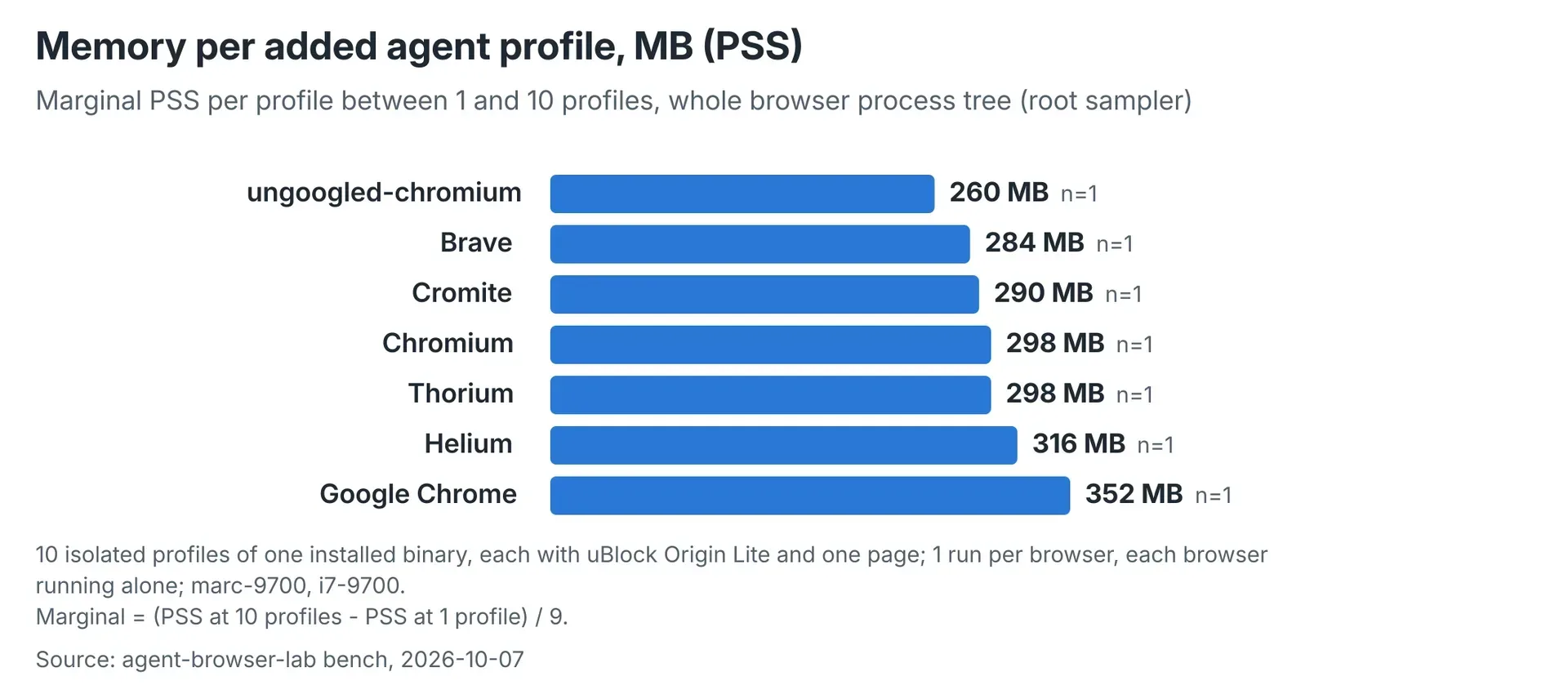 One run per browser, scaling from one to ten isolated profiles on an i7-9700. Each profile had uBlock Origin Lite and one page.
The test ran ten isolated profiles per browser on an i7-9700 running Debian 13. Each profile displayed one page from a six-page set. Browser configurations ran separately.
We measured proportional set size, or PSS: private memory plus each process’s share of shared memory. The root sampler covered the whole browser process tree and agreed with a separate per-tree sampler within 1–2%.
ungoogled-chromium had the lowest marginal memory use. The projections below include a 130 MB allowance per agent command-line process; idle CPU figures came from one run per browser.
| Browser | Extra PSS per profile (MB) | Idle cores per profile | Projected agents, 32 GB | Projected agents, 64 GB |
|---|---|---|---|---|
| ungoogled-chromium | 260 | 0.006 | 67 | 146 |
| Brave | 284 | 0.015 | 64 | 138 |
| Cromite | 290 | 0.011 | 62 | 136 |
| Chromium | 298 | 0.011 | 61 | 133 |
| Thorium | 298 | 0.016 | 61 | 133 |
| Helium | 316 | 0.013 | 59 | 128 |
| Chrome | 352 | 0.032 | 55 | 119 |
Chrome added 92 MB more per profile than ungoogled-chromium. Across 60 profiles, that difference would amount to about 5.5 GB.
These figures describe the browser workload. The 130 MB command-line allowance is a capacity-model assumption, not a universal runtime measurement. Budget separately for any additional application memory, local model, database and other services.
4How many Chrome instances can one server run?
Our memory model projects 55 Chrome agents on 32 GB and 119 on 64 GB. For ungoogled-chromium, the corresponding estimates are 67 and 146.
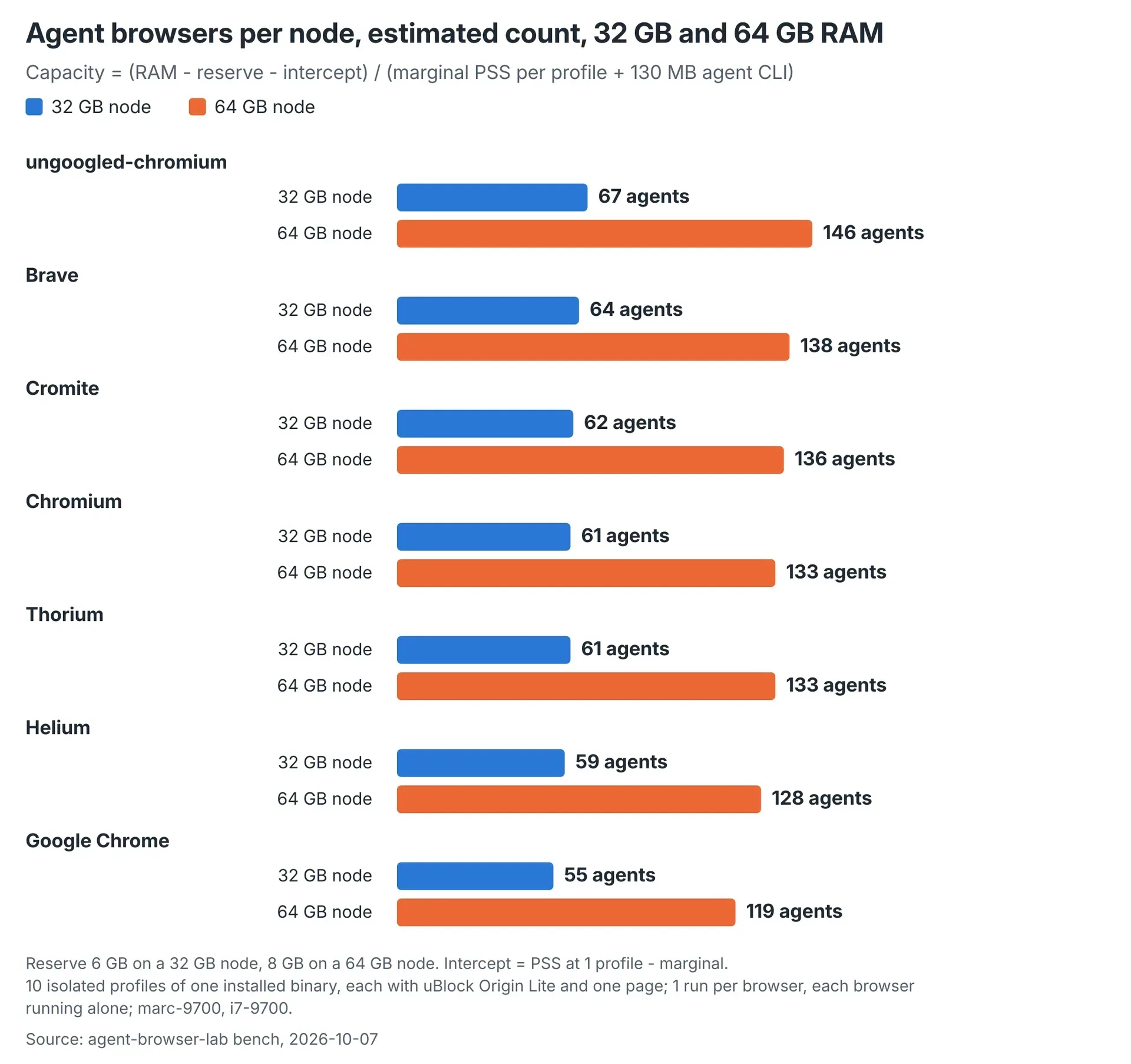 Memory projections include 130 MB per agent CLI and reserves of 6 GB or 8 GB. These are not demonstrated capacities for simultaneous task execution.
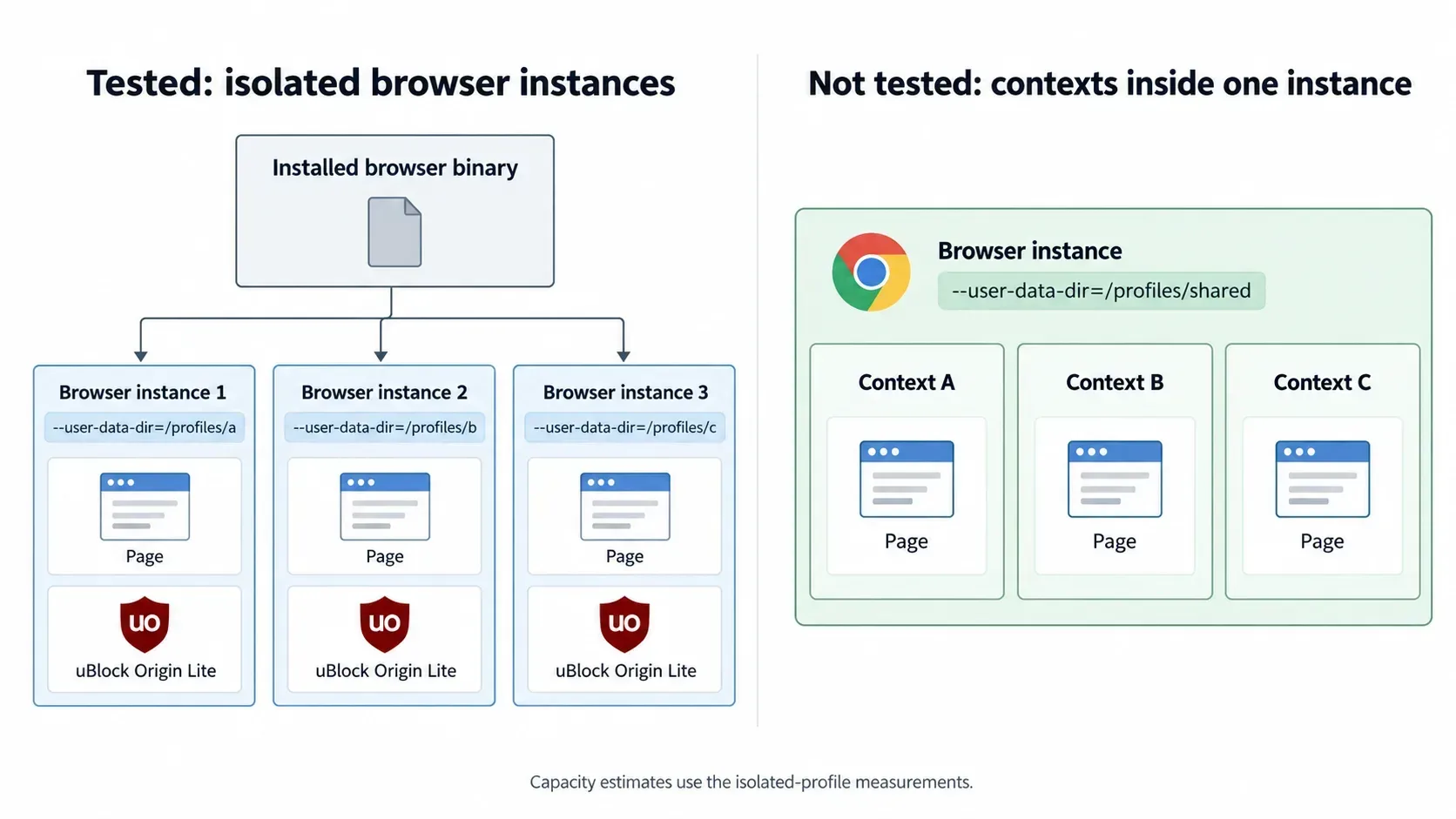
Each agent uses the same browser binary with a separate --user-data-dir. The test measures separate browser instances with isolated profiles, rather than multiple contexts inside one instance.
The model subtracts reserves and a fixed memory term before dividing by each agent’s cost:
agents = (RAM − reserve − intercept)
         / (marginal browser PSS + 130 MB agent CLI)
It reserves 6 GB on a 32 GB node and 8 GB on a 64 GB node. The intercept represents the fixed term. Each browser’s intercept is absent from the published report, so the displayed marginal costs alone cannot reproduce the exact counts.
Treat the counts as memory projections. The underlying comparison used ten profiles per build and did not establish active throughput at the projected capacity.
Two earlier results were withdrawn after a sampler missed browser processes: Brave at 219 MB per profile and a Chrome 60-profile cross-check at 216 MB. A corrected Chrome ladder was not measured. The process-accounting problem is explained below.
5Why is Chrome using CPU when tabs are idle?
Plain Chrome used roughly one full CPU core after our ten tabs loaded, even with the tabs untouched. Ad blocking reduced that work substantially.
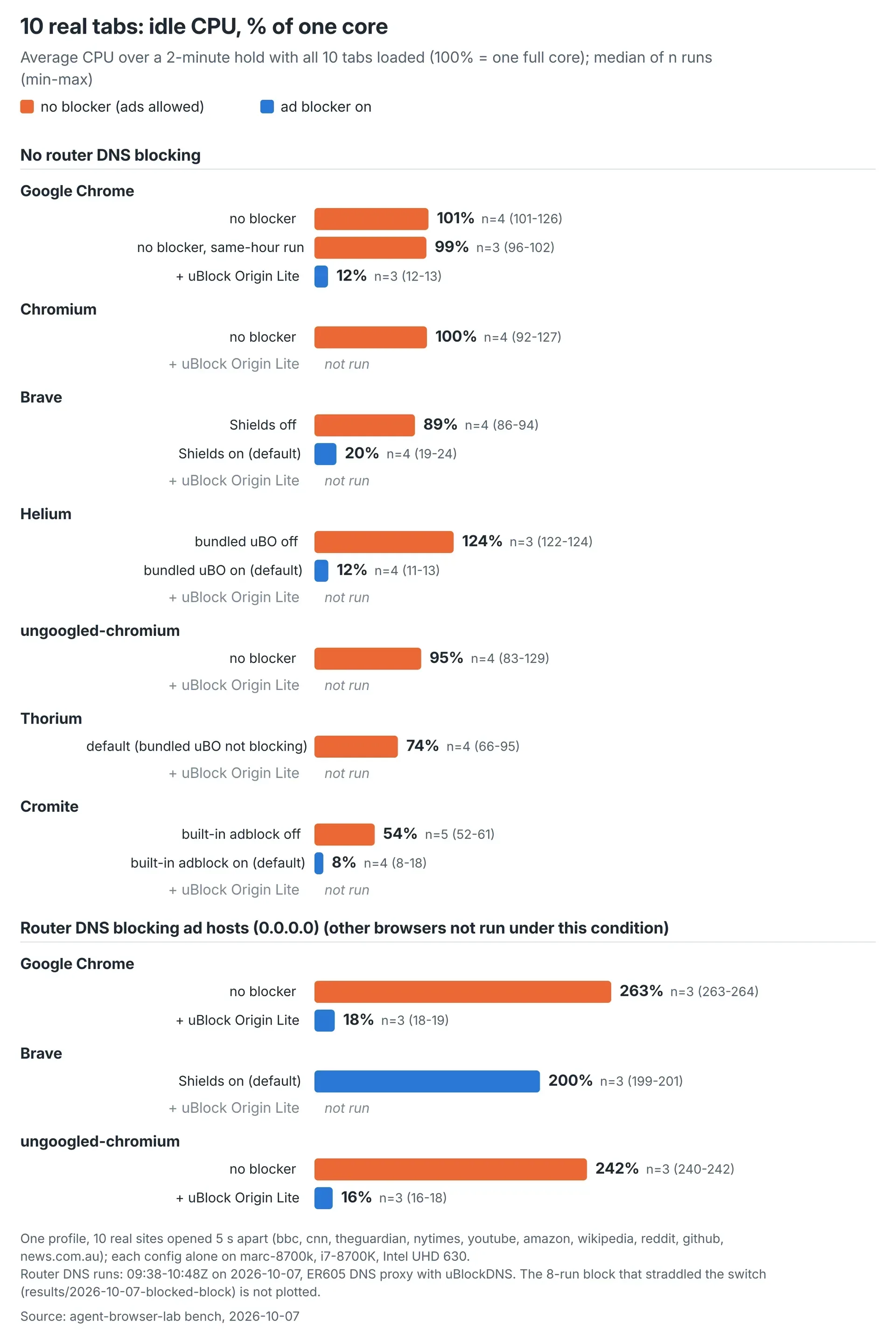 Median idle CPU over a two-minute hold, with observed ranges and run counts. Here, 100% equals one full CPU core.
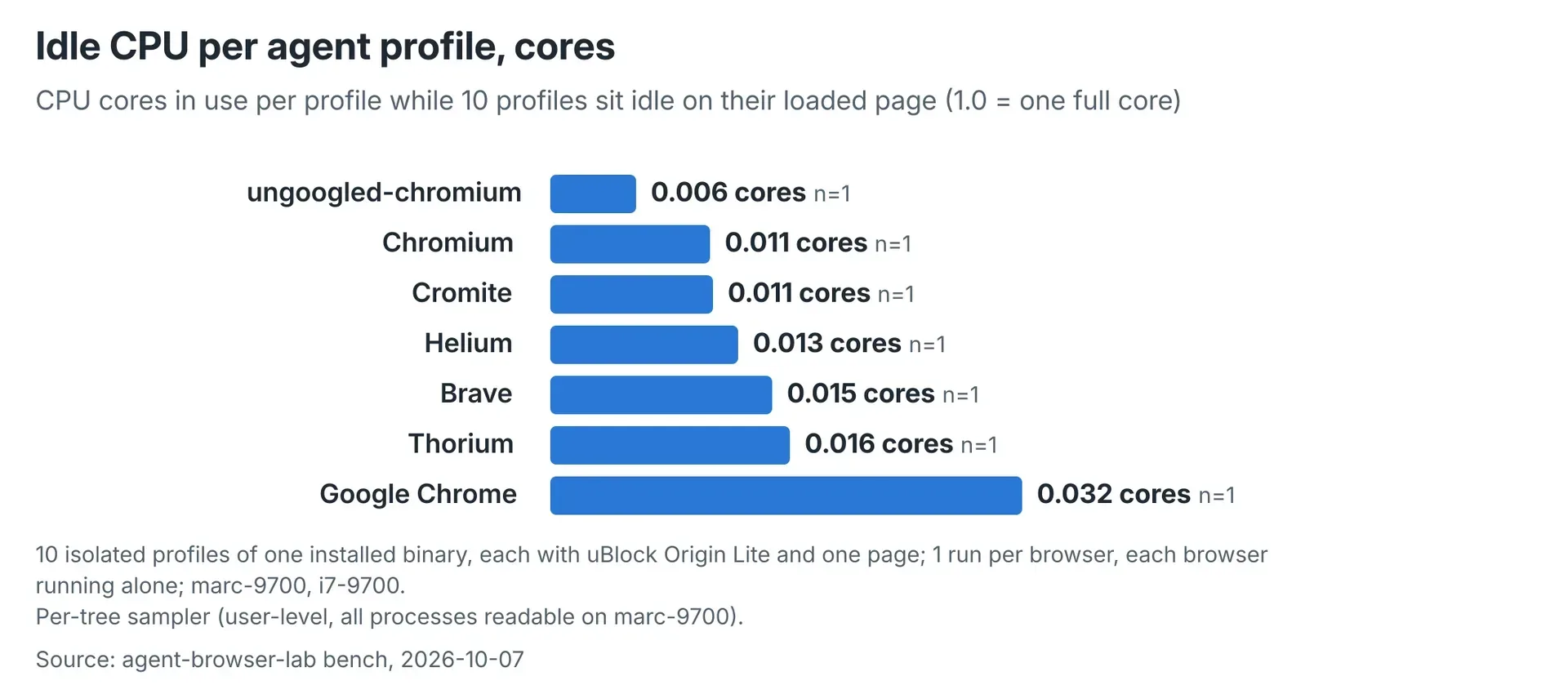 A separate workload: ten isolated one-page profiles, with one run per browser. Values range from 0.0058 to 0.0319 cores per profile.
The original plain-Chrome runs averaged 101% idle CPU during a two-minute hold. Chrome with uBlock Origin Lite averaged 12% in later runs before router blocking. Here, 100% means one full core.
Page loading needs a separate measure. CPU-seconds add up processor time across all browser processes and cores. Our window ran from the first tab opening until 60 seconds after the last tab loaded.
Plain Chrome recorded 322 CPU-seconds across about 135 seconds, equivalent to roughly 2.4 cores busy throughout. This is processor work, not load time. In a separate same-hour comparison, plain Chrome used 303 CPU-seconds and Chrome with uBlock Origin Lite used 66.
The isolated-profile test found another difference: Chrome used 0.032 idle cores per profile, against 0.006 for ungoogled-chromium. The report extrapolates about 1.9 versus 0.35 idle cores at 60 profiles.
Active agents need their own CPU measurement. Page loads, screenshots and simultaneous interactions were not measured at that scale. Even an idle test needs the network configuration recorded, as our DNS-blocking results showed.
6Does DNS ad blocking replace a browser ad blocker?
Our tested DNS-blocking configuration still needed uBlock Origin Lite because a CNN script repeatedly retried a blocked ad host.
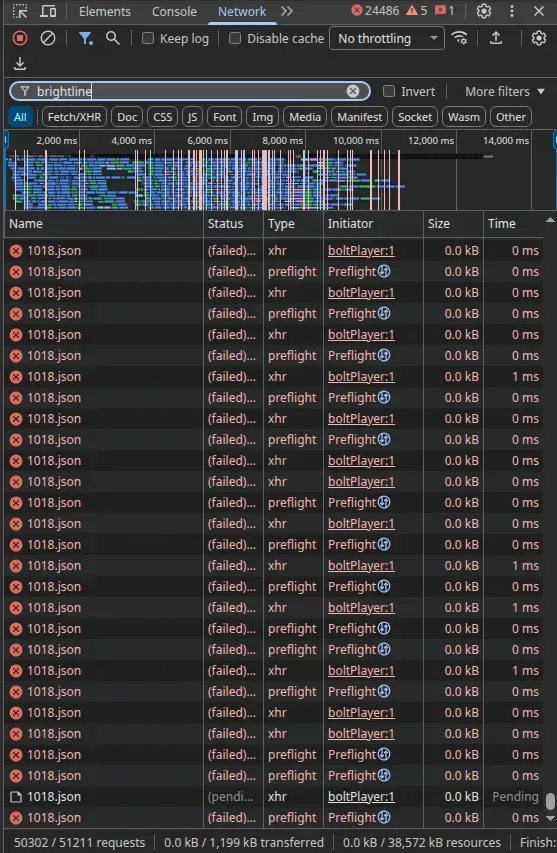 Failed requests observed in the tested DNS-blocking configuration. This screenshot does not establish how other DNS blockers behave.
After the router began resolving selected ad and analytics hosts to 0.0.0.0, a video-ad script retried cdn-media.brightline.tv. The bench recorded 430,000–795,000 failed requests in about four minutes, roughly 2,000–3,300 per second.
Those retries kept about 2–2.6 CPU cores busy while the tabs sat idle. With uBlock Origin Lite, CNN recorded 22 failed requests in total. Brave’s Shields did not block that host in this configuration.
Adding uBlock Origin Lite reduced memory and idle CPU for Chrome and ungoogled-chromium under this DNS profile.
| Configuration under router DNS blocking | Ten-tab PSS (MB) | Idle CPU |
|---|---|---|
| Chrome without a browser blocker | 2,784 | 263% |
| Chrome with uBlock Origin Lite | 1,630 | 18% |
| Brave with Shields | 2,269 | 200% |
| ungoogled-chromium without a browser blocker | 2,449 | 242% |
| ungoogled-chromium with uBlock Origin Lite | 1,551 | 16% |
Each configuration ran alone three times, interleaved from 09:38 to 10:48 UTC on 7 October 2026. The router used an ER605 DNS proxy with uBlockDNS over DNS over HTTPS. These figures belong to that blocking profile, which was due to change after 11:00 UTC.
We did not repeat the test with Pi-hole or NextDNS. Measure idle CPU on your actual pages before relying on network blocking alone.
7Which browser uses the least RAM for everyday browsing?
Helium used the least RAM in our default ten-tab test, with much of its lead explained by its bundled ad blocker. Chrome with uBlock Origin Lite came close.
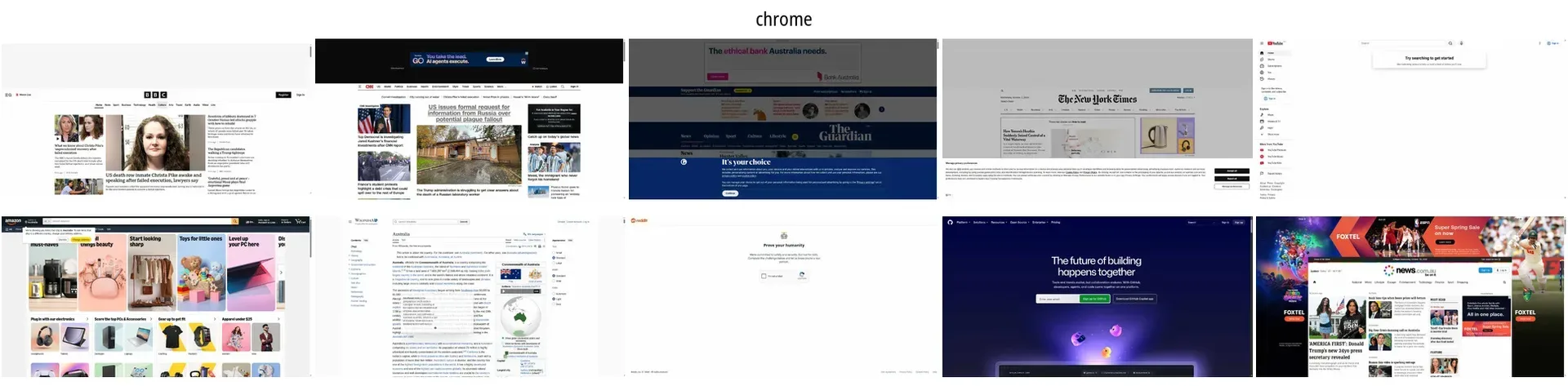 The ten-tab browsing workload differs from the isolated one-page profiles used for agent capacity estimates.
 Chrome with uBlock Origin Lite on the same benchmark sites.
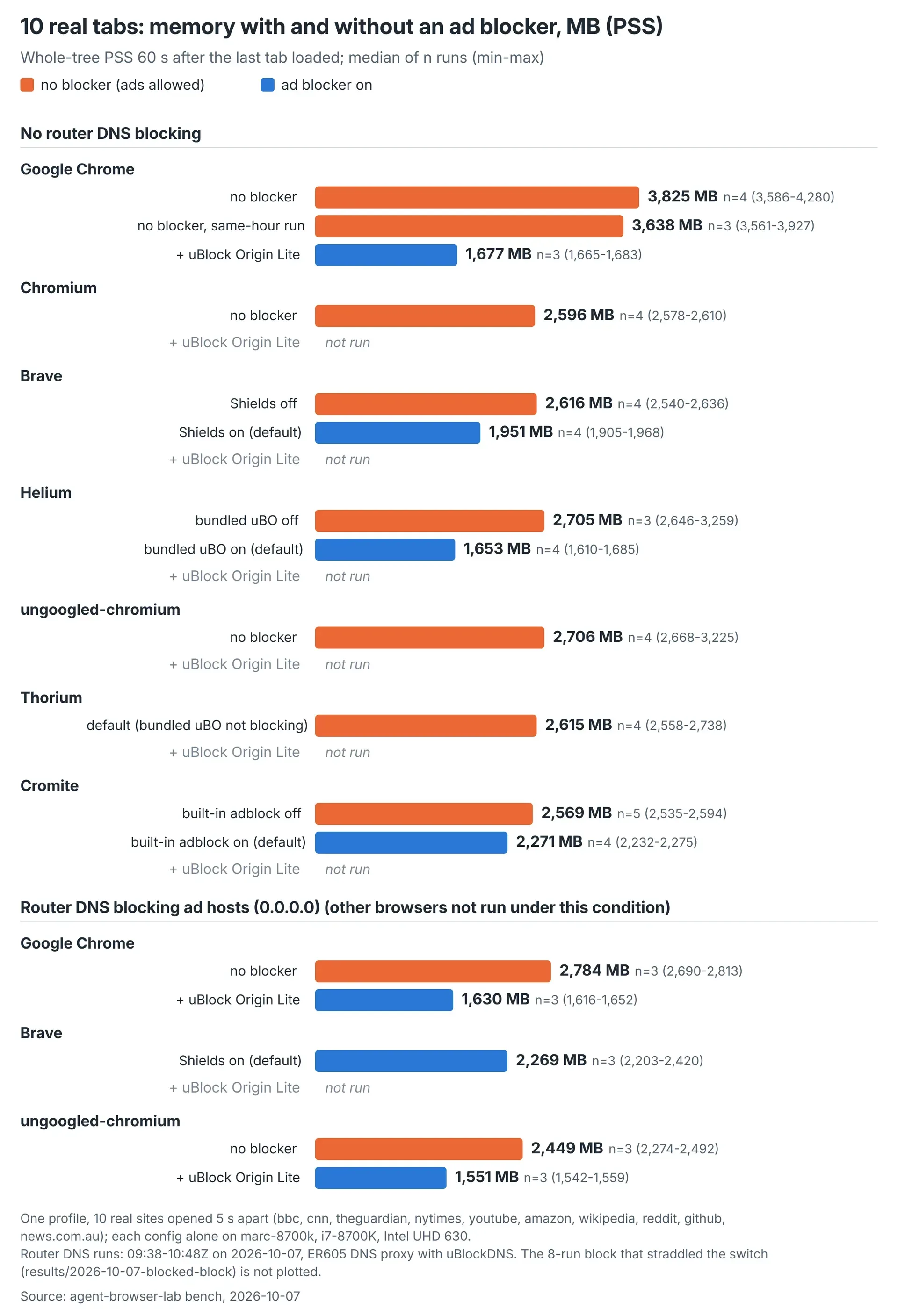 Memory sampled 60 seconds after the last load. Each result shows the median, observed range and run count; DNS conditions remain separate.
These single-profile tests are separate from the agent measurements. Each run opened the same ten sites five seconds apart, including BBC, CNN, YouTube, Amazon and Reddit. No Google traffic was included, and no consent banner was clicked.
Chrome with uBlock Origin Lite used 54% less memory and 78% less CPU than the same-hour plain-Chrome control.
| Configuration | PSS after loading (MB) | CPU-seconds | Runs |
|---|---|---|---|
| Helium with bundled uBlock Origin | 1,653 | 71 | 4 |
| Chrome with uBlock Origin Lite | 1,677 | 66 | 3 |
| Brave with Shields | 1,951 | 82 | 4 |
| Plain Chrome, same-hour control | 3,638 | 303 | 3 |
With blockers disabled, six of the seven builds clustered between 2,569 and 2,706 MB. Chrome remained higher at 3,638 MB in the same-hour control. Comparing browsers at their defaults therefore mixes browser differences with ad-blocking differences.
Chrome had a larger main browser process and more renderers in the measured runs. The cause of the remaining gap is unverified. We did not isolate the contribution of individual Google services.
Our team recommendation is Chrome with uBlock Origin Lite. It retains Safe Browsing, sync, Widevine and Chrome’s update channel. Managed policy installs the extension, which also works when laptops leave the office router.
For agent nodes, the remaining per-profile difference deserves closer attention, alongside the features each build keeps.
8How do browser architectures affect the choice?
Architecture identifies features and rendering options, but our measurements establish the resource ranking. We did not measure which individual component caused each browser’s memory or CPU cost.
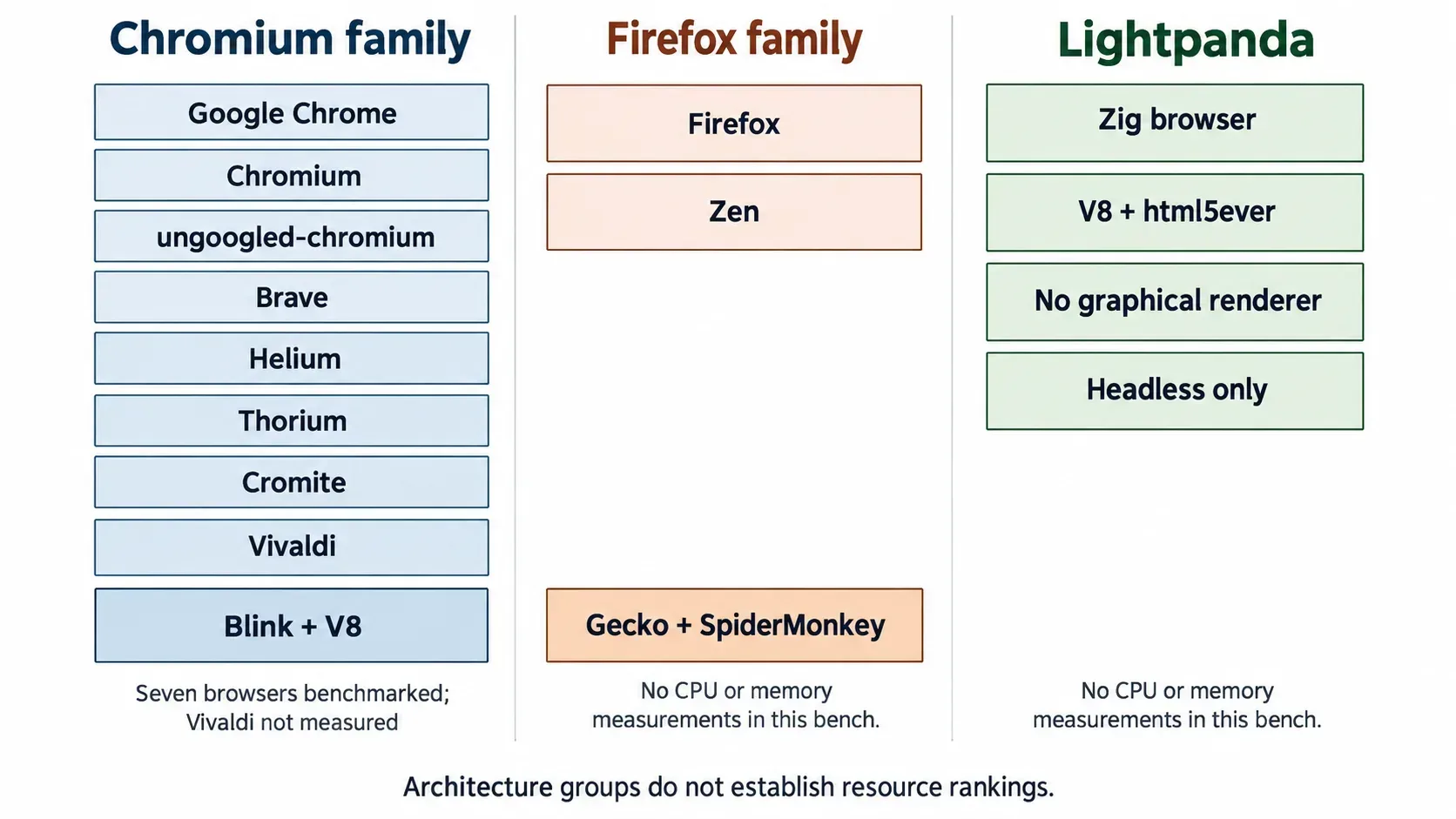
The comparison below covers the original seven browsers plus Firefox, Vivaldi, Zen and Lightpanda. All four now have memory and CPU measurements from the 8 October follow-up, reported separately in the next section. “Not specified” means the supplied evidence did not identify a separate implementation.
| Browser | Engine | Process model | Browser interface | Ad blocking | Bundled features or omissions |
|---|---|---|---|---|---|
| Google Chrome | Blink and V8 | Site Isolation | Views and WebUI | Better Ads filtering; uBOL added for our agent test | Google sync, Widevine, Gemini in Chrome |
| Chromium | Blink and V8 | Chromium site-process design | Views and WebUI | Default test logged 161 ad requests; uBOL added for agents | Tested build lacked Widevine and Google sync |
| ungoogled-chromium | Chromium without Google web-service dependencies | Separate implementation not specified | Retains the default Chromium experience | uBOL added for our test; legacy-extension patch | Safe Browsing and Google sync removed; no Widevine in our probe |
| Brave | Chromium | Separate implementation not specified | Toolkit not specified | Built-in Shields, powered by adblock-rust; uBOL added for agents | Wallet, VPN, Leo, opt-in BAT rewards, news and Tor integration |
| Helium | Chromium, modified from ungoogled-chromium | Separate implementation not specified | Minimal interface; toolkit not specified | Bundled uBlock Origin fork | Vertical tabs, split view and local bangs; no built-in password manager |
| Thorium | Chromium | Separate implementation not specified | Restores the pre-M124 Chrome interface | Bundled uBlock Origin; MV2 enabled in supplied source | ChromeDriver, thorium_shell and classic download shelf |
| Cromite | Chromium fork based on Bromite | StrictOriginIsolation and SitePerProcess enabled | Toolkit not specified | Built-in ad blocker; desktop MV2 support | Integrated AI features disabled by default; WebGL off in our probe |
| Firefox | Gecko and SpiderMonkey | Fission site isolation | HTML, CSS, JavaScript and some XUL | Enhanced Tracking Protection; continued MV2 support | Optional chatbot sidebar; staged built-in VPN rollout |
| Vivaldi | Chromium | Separate implementation not specified | React with HTML, CSS and JavaScript | Built-in tracker and ad blocker | Mail, calendar, notes, tasks, feeds and Proton VPN |
| Zen | Firefox-based | Separate implementation not specified | Customisation through userChrome.css |
Tracking protection | Workspaces, split view, Glance and Firefox Sync |
| Lightpanda | Zig browser using V8 and html5ever; no graphical renderer | Native agent and browser share one process | Headless only | README lists an implemented ad blocker | lightpanda agent and MCP server |
Chromium uses Blink for rendering and V8 for JavaScript. Sharing that base does not establish identical resource use. Our agent test still measured 260 MB per extra ungoogled-chromium profile and 352 MB for Chrome.
Interface technology also needs careful interpretation. Chrome uses Views and WebUI, Vivaldi uses a React interface, and Firefox uses web technologies with some XUL. We did not measure the memory attributable to those interfaces.
Ad-blocking design is directly relevant to the tested configuration. Brave Shields is built into Chromium rather than relying on an extension manifest version. uBlock Origin Lite filters declaratively without a permanent filtering process. Our results show the total browser cost with the specified blockers, not the isolated cost of either blocker.
Lightpanda’s low memory use makes it worth considering for headless tasks, but it cannot provide a headful session. In the 8 October follow-up, it added 60 MB per isolated profile. Its ten-tab workload settled at a median 1,024 MB but peaked at 8,112 MB during loading. The comparison below keeps those workloads separate.
9How do Firefox, Vivaldi and Lightpanda compare for agents?
For more headful agents within your RAM budget, ungoogled-chromium led this follow-up test. It added 288 MB per isolated profile, compared with Vivaldi’s 459 MB and Firefox’s 913 MB.
Lightpanda added 60 MB per isolated profile in this follow-up and runs headless only. Its median ten-tab loading peak was 8,112 MB. Low settled memory alone does not establish what fits during loading. Our separate headless browser memory and CPU benchmark reports settled memory, loading peaks and CPU use across six configurations.
The follow-up ran on an i7-8700K on 8 October 2026. It measured ten tabs in one browser and ten isolated one-page profiles. The earlier agent comparison used an i7-9700; these results remain separate. Neither test established simultaneous task throughput at the projected fleet capacities.
Each ten-tab configuration ran alone for three repetitions. Root samples measured whole-process-tree proportional set size, or PSS, after a 60-second settle. Idle CPU covered the following two-minute hold; 100% means one full core. CPU-seconds measure processor work across cores, rather than elapsed load time.
All retained memory samples came from a live browser. The harness excluded one invalid Lightpanda run; no retained run failed the alive check.
With blockers active, Chrome, ungoogled-chromium and Vivaldi used less ten-tab memory than the four Firefox-family builds. The table gives individual runs in repetition order, followed by medians and observed ranges.
| Configuration | Load event within 30 s, of 10 tabs, reps | PSS per rep, MB | PSS median (range), MB | Peak PSS median (range), MB | Idle CPU per rep, % of one core | Idle CPU median (range), % | CPU-seconds, median (range) |
|---|---|---|---|---|---|---|---|
| Lightpanda (headless only) | 10 / 10 / 10 | 1,050 / 1,020 / 1,024 | 1,024 (1,020–1,050) | 8,112 (8,055–8,191) | 4.4 / 4.5 / 4.2 | 4.4 (4.2–4.5) | 64 (63–65) |
| ungoogled-chromium + uBOL | 10 / 10 / 10 | 1,477 / 1,485 / 1,569 | 1,485 (1,477–1,569) | 1,910 (1,899–2,215) | 6.0 / 6.4 / 3.4 | 6.0 (3.4–6.4) | 45 (45–60) |
| Chrome + uBOL | 10 / 10 / 10 | 1,690 / 1,525 / 1,543 | 1,543 (1,525–1,690) | 2,056 (2,002–2,367) | 5.8 / 6.5 / 11.4 | 6.5 (5.8–11.4) | 52 (48–65) |
| Vivaldi + uBOL | 10 / 10 / 10 | 2,153 / 2,163 / 2,044 | 2,153 (2,044–2,163) | 2,526 (2,442–2,600) | 10.8 / 11.7 / 11.5 | 11.5 (10.8–11.7) | 74 (63–74) |
| LibreWolf (uBO bundled) | 10 / 9 / 10 | 2,558 / 2,512 / 2,651 | 2,558 (2,512–2,651) | 3,056 (2,840–3,065) | 8.4 / 5.0 / 4.9 | 5.0 (4.9–8.4) | 76 (59–82) |
| Zen + uBO | 10 / 10 / 10 | 2,728 / 2,585 / 3,022 | 2,728 (2,585–3,022) | 2,852 (2,745–3,129) | 11.7 / 9.5 / 24.8 | 11.7 (9.5–24.8) | 88 (86–119) |
| Firefox + uBO | 10 / 10 / 10 | 3,090 / 2,920 / 3,141 | 3,090 (2,920–3,141) | 3,195 (3,028–3,283) | 11.7 / 10.3 / 18.7 | 11.7 (10.3–18.7) | 103 (96–108) |
| Camoufox (uBO bundled) | 10 / 10 / 10 | 3,276 / 3,280 / 3,229 | 3,276 (3,229–3,280) | 3,662 (3,490–3,728) | 94.1 / 95.4 / 124.3 | 95.4 (94.1–124.3) | 212 (204–224) |
| Chrome, no blocker | 7 / 8 / 7 | 3,593 / 3,596 / 3,272 | 3,593 (3,272–3,596) | 4,692 (4,441–4,910) | 30.7 / 30.4 / 13.1 | 30.4 (13.1–30.7) | 251 (207–252) |
| Vivaldi, default built-in blocker | 7 / 7 / 7 | 3,620 / 4,486 / 4,053 | 4,053 (3,620–4,486) | 4,708 (4,597–4,826) | 14.7 / 14.6 / 13.8 | 14.6 (13.8–14.7) | 298 (263–362) |
| Firefox, no blocker | 8 / 8 / 8 | 4,586 / 4,061 / 4,847 | 4,586 (4,061–4,847) | 5,409 (5,081–5,665) | 32.1 / 16.9 / 44.3 | 32.1 (16.9–44.3) | 292 (272–318) |
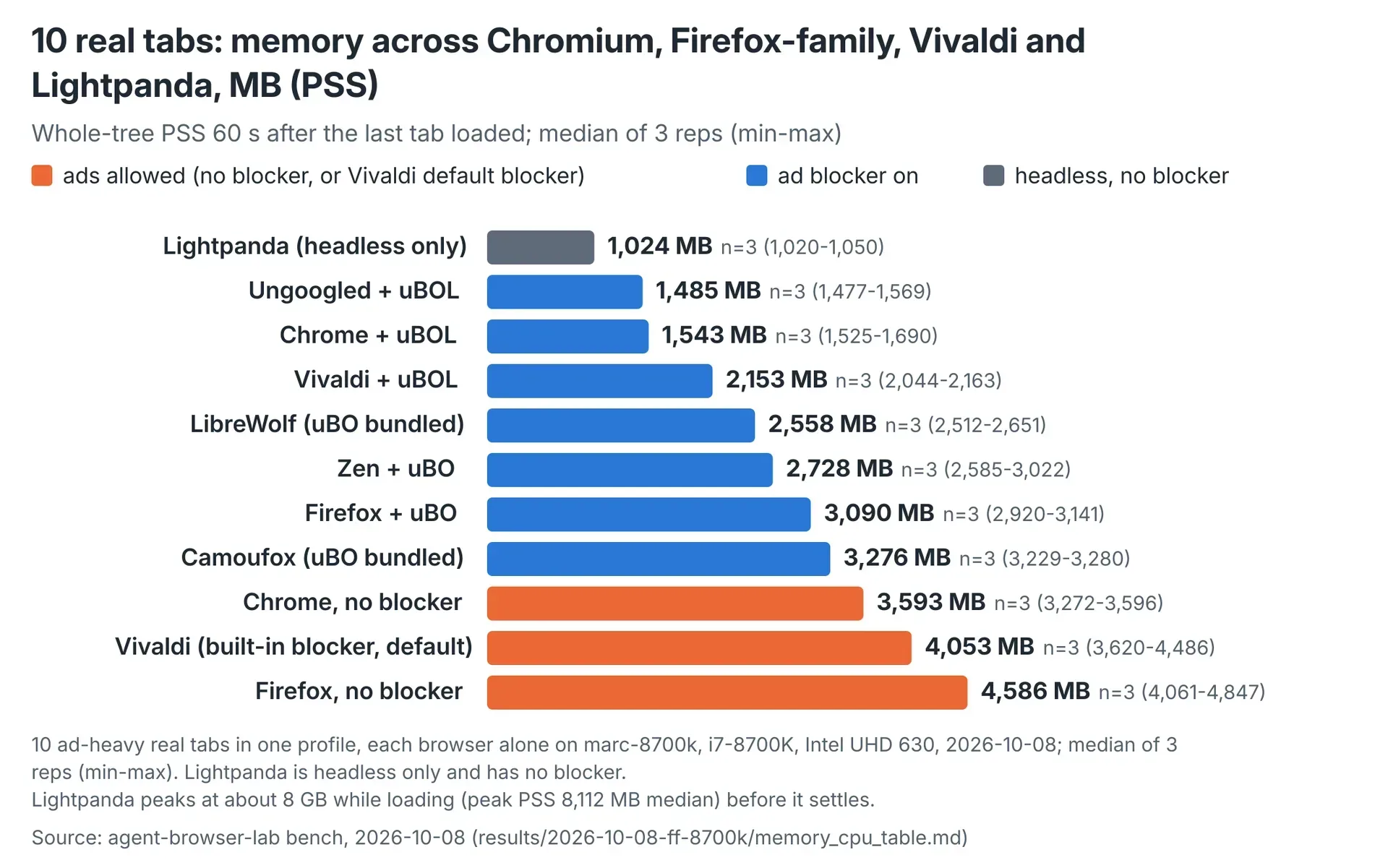 Whole-tree PSS after the 60-second settle, median and range of three repetitions, i7-8700K, 8 October 2026.
Tabs that missed the 30-second load-event deadline stayed open and continued loading. At the check, affected CNN, news.com.au and theguardian.com pages held 8,000–16,000 characters of text and more than 250 requests. Each run still held ten pages.
Camoufox’s median idle CPU was 95.4% of one core, with a range of 94.1–124.3%. It recorded a median 212 CPU-seconds during loading, compared with Firefox’s 103 with uBlock Origin.
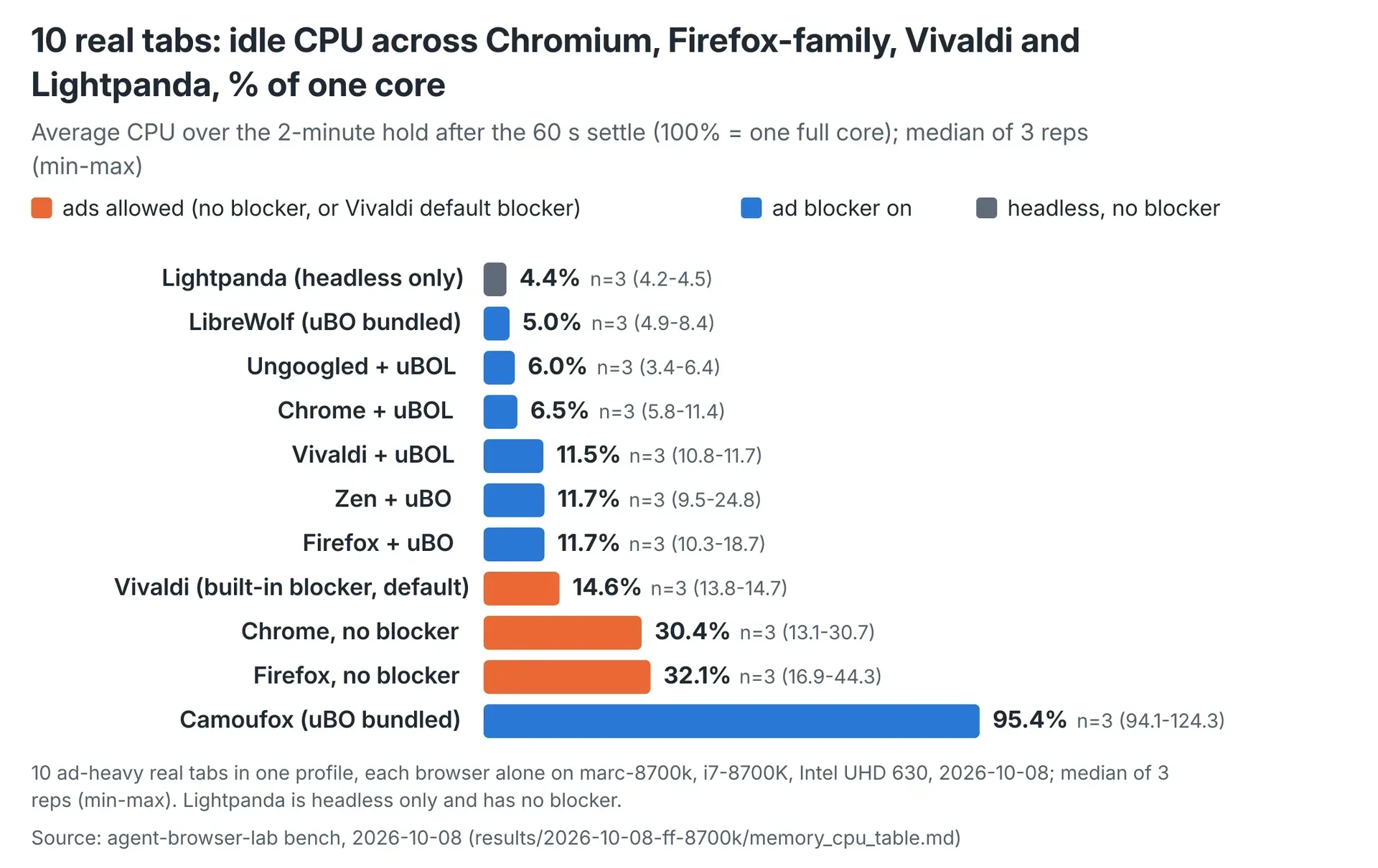 Idle CPU over a two-minute hold after the settle, median and range of three repetitions. 100% equals one full core.
Vivaldi with uBlock Origin Lite used 2,153 MB, compared with 4,053 MB at defaults. Median idle CPU was 11.5% versus 14.6%. All ten tabs reached the load event within 30 seconds with uBOL; seven did in each default run.
For agent capacity, the separate profile test provides the relevant memory figure. Chrome, ungoogled-chromium and Vivaldi added less memory per isolated profile than the Firefox-family builds. Each profile held one page; marginal PSS equals memory at ten profiles minus memory at one, divided by nine.
| Configuration | Marginal PSS per profile, MB | Idle cores with 10 profiles |
|---|---|---|
| Lightpanda (headless only) | 60 | 0.05 |
| ungoogled-chromium + uBOL | 288 | 0.10 |
| Chrome + uBOL | 353 | 0.23 |
| Vivaldi + uBOL | 459 | 0.21 |
| Camoufox (uBO bundled) | 708 | 0.66 |
| Zen + uBO | 749 | 0.43 |
| LibreWolf (uBO bundled) | 827 | 0.86 |
| Firefox + uBO | 913 | 0.85 |
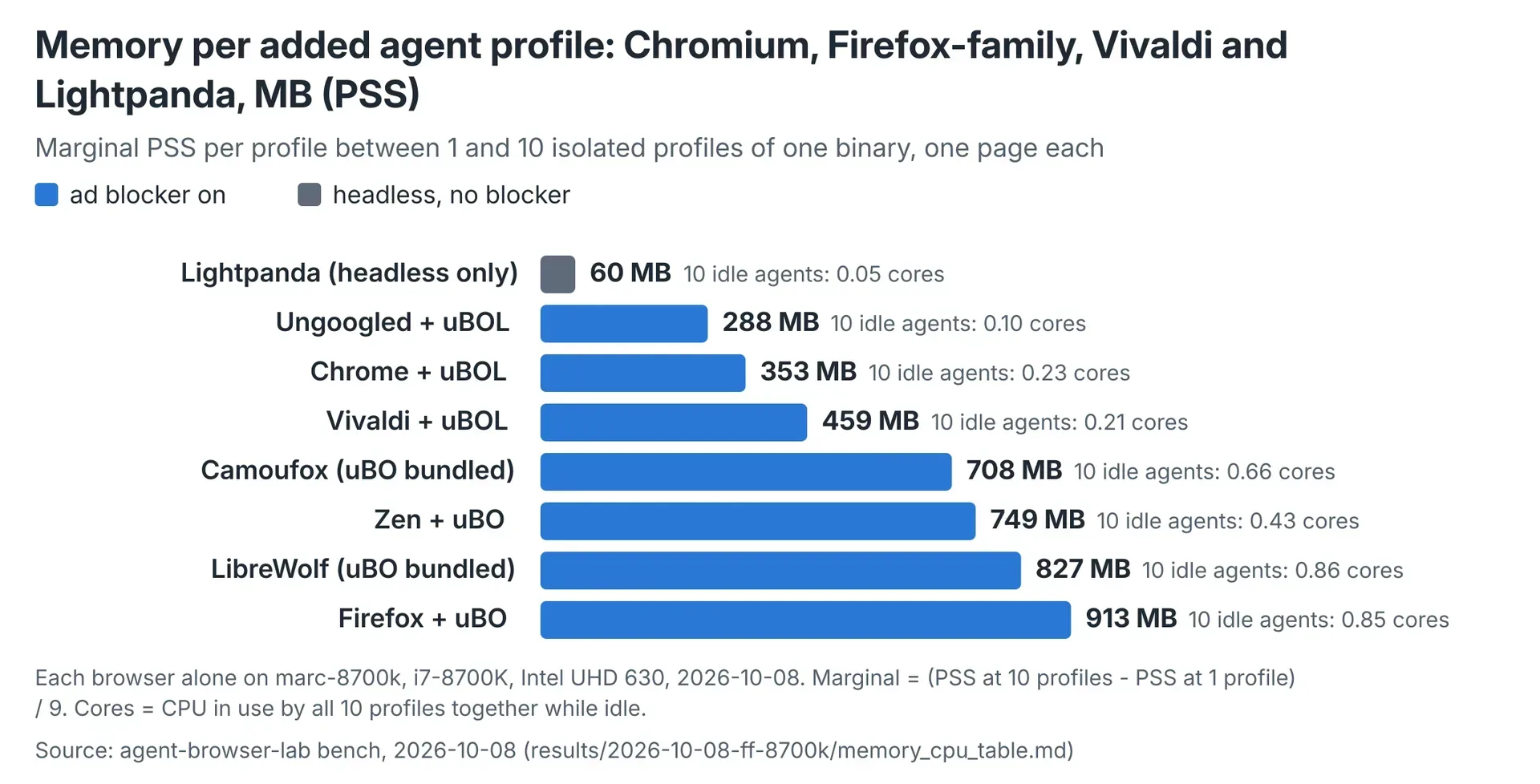 Marginal whole-tree PSS per added profile, i7-8700K, 8 October 2026. Idle CPU in the table covers all ten profiles.
Firefox with uBlock Origin added 625 MB more per profile than ungoogled-chromium with uBlock Origin Lite. Ten Firefox profiles used 0.85 idle cores, compared with 0.10 for ungoogled-chromium.
Chrome added 353 MB per profile here, close to the earlier i7-9700 result of 352 MB. ungoogled-chromium added 288 MB here, versus 260 MB in that earlier test. Different machines and days produced those measurements.
Lightpanda’s 60 MB marginal profile cost belongs to a headless-only browser. Its ten-tab workload settled at a median 1,024 MB but peaked at 8,112 MB during loading, the highest peak measured here.
Among the headful configurations, ungoogled-chromium with uBlock Origin Lite had the lowest marginal memory cost. Its feature omissions and update channels are the next part of the fleet decision.
10Which browser should AI agents run?
For our tested Linux agent workload, we recommend ungoogled-chromium with uBlock Origin Lite. It had the lowest marginal memory and idle CPU use.
 Every profile in the agent-pattern comparison included uBlock Origin Lite.
The Flathub build worked with our clean-browser launcher, a reachable debugging port and the real GPU. Google served three of three paced searches in that configuration. An earlier tarball-build check served ten of ten quick searches.
The feature trade-offs need a decision. ungoogled-chromium removes Safe Browsing and Google sync, and our Widevine probe returned NotSupportedError. A Web Store helper restored an “Add to Chrome” button, but installation required a person to confirm the browser prompt.
Flathub provides automatic updates. The measured median Linux update lag of 2.5 days applies to the tarball channel across the last 15 releases. We did not measure a Flathub update schedule.
Chrome stable moved to version 155 on 6 October 2026. At the time of the bench, ungoogled-chromium had no version 155 build.
Brave is another option. It added 284 MB per profile, receives apt updates, and served ten of ten quick Google searches through clean-browser. Our agent configuration still includes uBlock Origin Lite because Shields missed the host involved in the DNS retry storm.
Choose Chrome with uBlock Origin Lite when its retained features justify the higher per-profile cost. Before applying any of these figures to a fleet, check that your memory measurement includes every browser process.
11How should you measure browser memory on Linux?
Measure the complete browser process tree, including processes that leave the original launch scope.
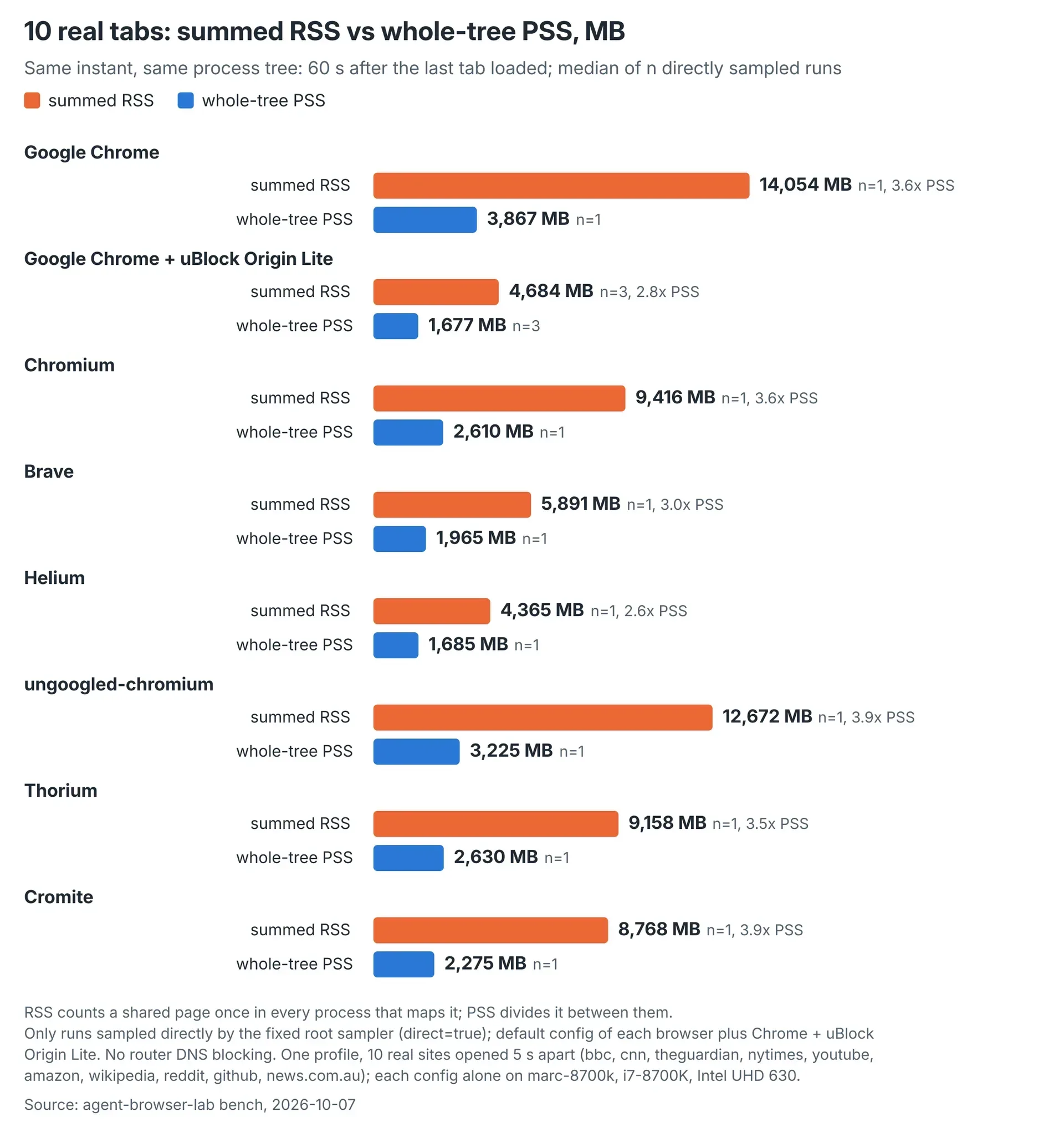 Directly sampled runs only. For plain Chrome, one run recorded 14,053.7 MB RSS and 3,866.6 MB PSS.
In this environment, all seven Chromium-based builds moved their main process into a separate systemd scope after starting. Later utility processes followed it. A sampler reading only the launch scope missed them.
With five Chrome profiles, the per-tree sum measured 2,002 MB while the launch scope alone showed 1,450 MB. In a ten-tab Chrome run, the moved main process held 653 MB.
Our replacement root sampler located the moved processes and included their descendants. It matched the per-tree measurement within 2%. Root access also addressed renderers hidden from a user-level reader by Brave’s setuid sandbox on Ubuntu.
The memory metric matters too. In a clean ten-tab Chrome run, summed resident set size, or RSS, was 14,054 MB. PSS was 3,867 MB, a 3.6× difference. Summing RSS counts shared memory repeatedly across processes.
That comparison does not establish an overcount for every Task Manager metric. It shows why the accounting method must accompany the number.
The first ten-tab repetitions required correction after the scope problem was found. Direct fourth-run totals were within 0–3% of the corrected earlier runs for ten of eleven configurations. ungoogled-chromium’s fourth run had a larger main process and a wider range.
Memory accounting tells you what fits. Page-access tests tell you whether the browser receives the content needed for the task.
12What did the Google launch test establish?
Launch settings changed whether Google returned results or its /sorry page in our headful tests. We measured access outcomes, not Google’s internal checks.
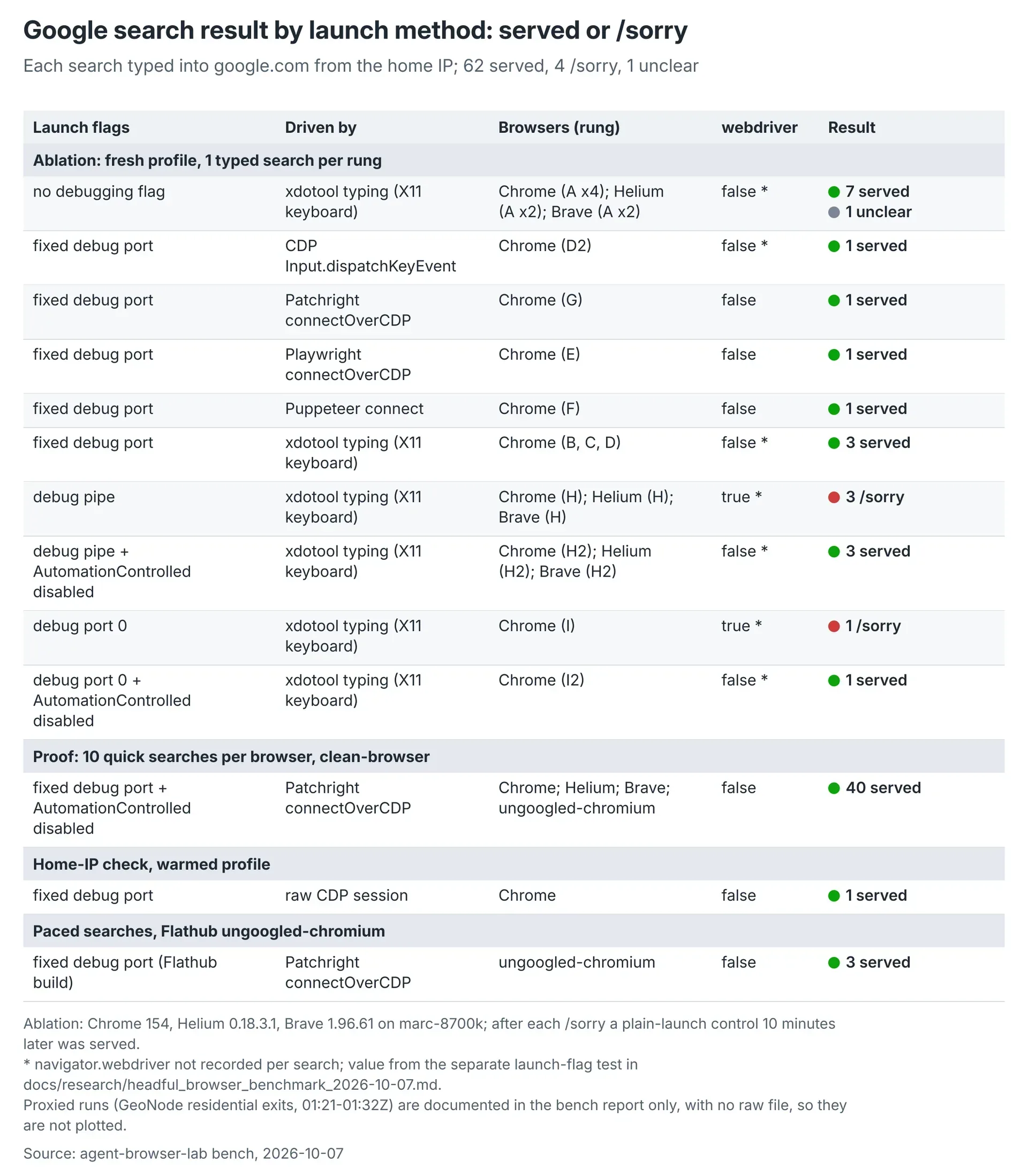 Recorded outcomes total 62 served searches, four /sorry responses and one unclear result. They do not reveal Google’s internal checks or guarantee future access.
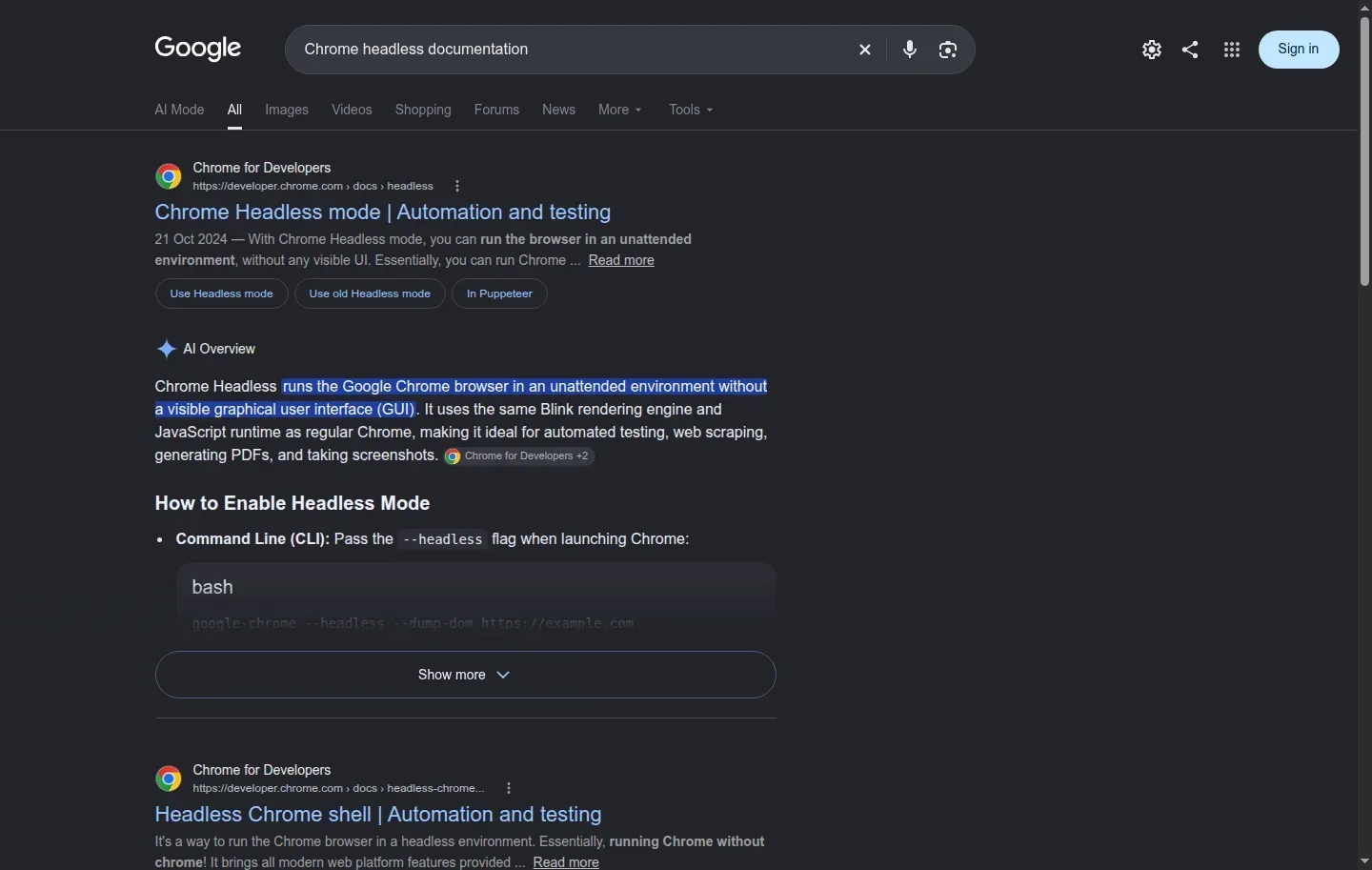 A served result from the tested fixed-port configuration.
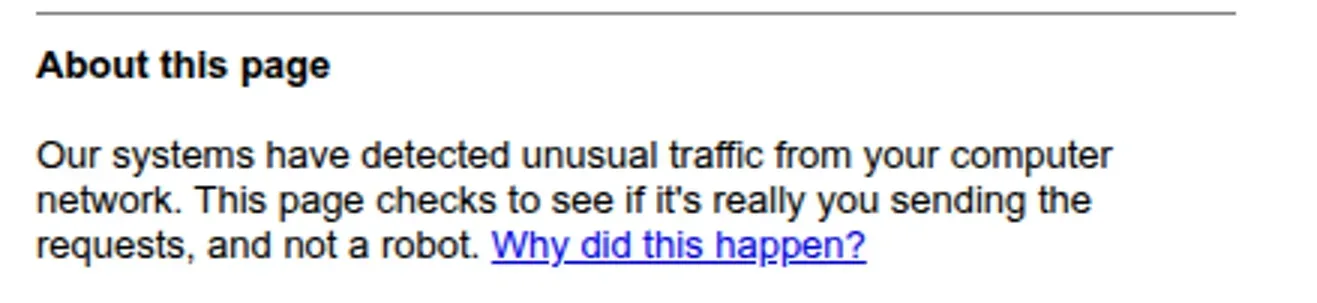 A recorded refusal after a Playwright-launch search. The outcome alone does not establish what Google detected.
On Chrome 154, a plain launch and a fixed debugging port both left navigator.webdriver false and received results. Playwright, Puppeteer and Patchright connections to the fixed-port browser also received results.
Pipe and port-zero launches set the property true and received /sorry. Adding --disable-blink-features=AutomationControlled made the property false, and those configurations received results.
Tests used fresh profiles on one home IP. After each block, a plain-browser control received results following a ten-minute wait. Helium and Brave showed the same plain-launch, pipe-launch and flag-change pattern.
These observations do not guarantee future access. All tests were headful, so they also do not establish whether the window itself affected the outcome.
Our clean-browser launcher starts the browser on a fixed port derived from the profile path. Agents connect using connectOverCDP, puppeteer.connect or agent-browser --cdp. A follow-up run served ten of ten searches each for Chrome, Helium and Brave.
13Can an older computer run these browser agents?
Our tests ran these browser configurations on i7-8700K and i7-9700 systems. They support a trial on existing hardware, rather than a universal minimum specification.
Browser-based research, page checks and screenshot-driven work are tasks to assess. Use your actual workflow. A single profile with ten tabs and ten separate one-page profiles are different workloads.
Measure the complete browser tree while one agent performs its work. Record peak memory, active CPU and idle CPU, then repeat with more concurrent profiles. Include the runtime and other services.
The 32 GB and 64 GB projections can guide that trial. Capacities for 8 GB and 16 GB machines remain untested, and the missing fixed memory terms prevent exact recalculation.
Locally hosted inference needs a separate assessment. No local model ran in these browser tests.
Can a headful browser run without a monitor?
A headful browser can open its window on a virtual Xvfb display without a physical monitor.
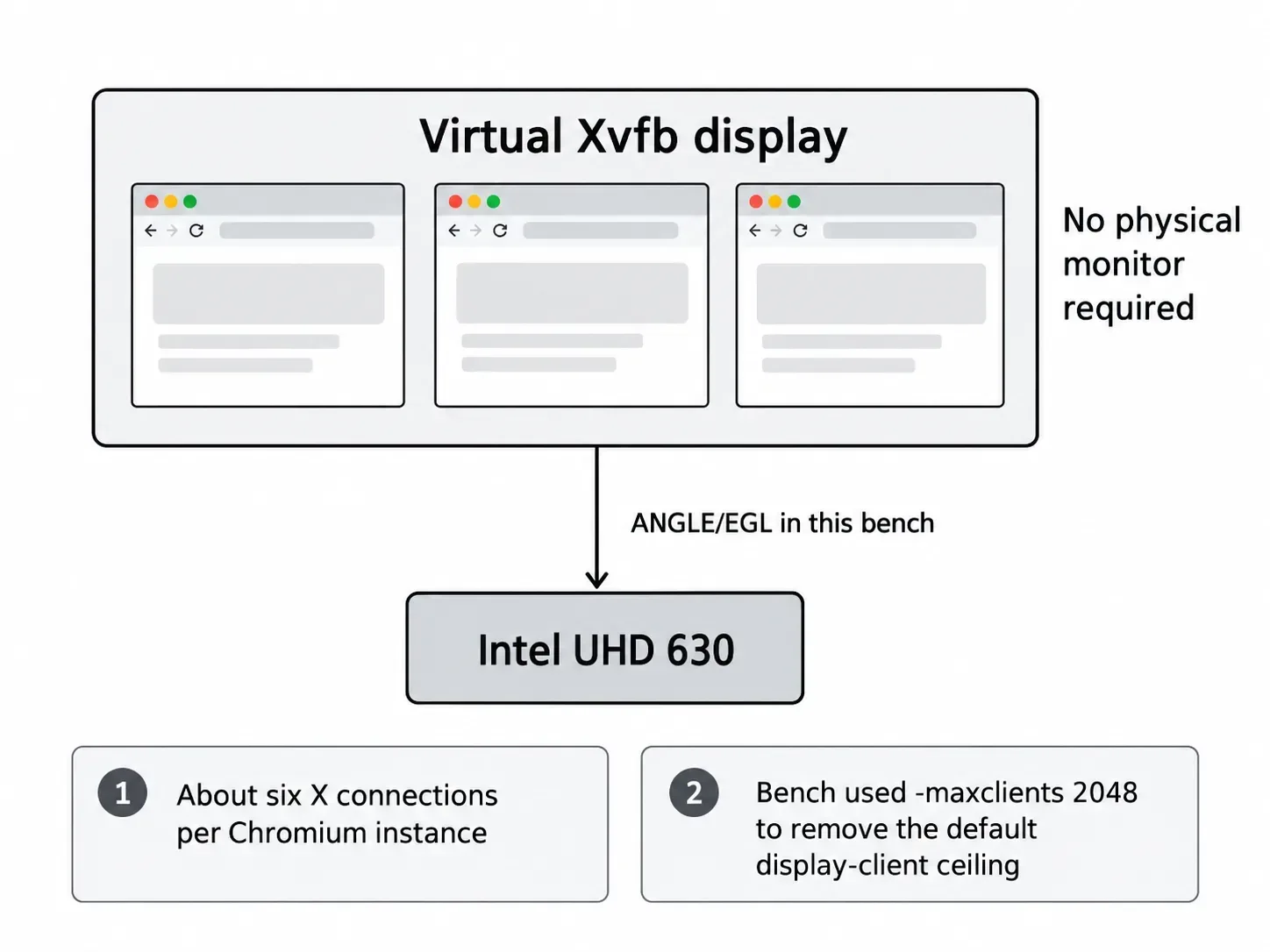
Our bench used hidden Xvfb displays and ANGLE/EGL flags to render through the Intel UHD 630. Cromite had WebGL disabled by default, and no browser returned a WebGPU adapter in this environment.
Display connections can limit scale before the projected memory capacity is reached. Each Chromium instance held about six X connections, and the bench reached the default 256-client ceiling at around 45 profiles. Starting Xvfb with -maxclients 2048 removed that ceiling for the bench.
Ubuntu setup also affected whether browsers started. Helium, ungoogled-chromium, Cromite and the tested xtradeb Chromium build initially failed with “No usable sandbox” on Ubuntu 24.04. Our installer added a userns AppArmor profile for each real binary.
14When should an agent use headful instead of headless?
Use headful when the task needs a desktop window, human takeover or the rendering environment you intend to test. Screenshots alone do not require it.
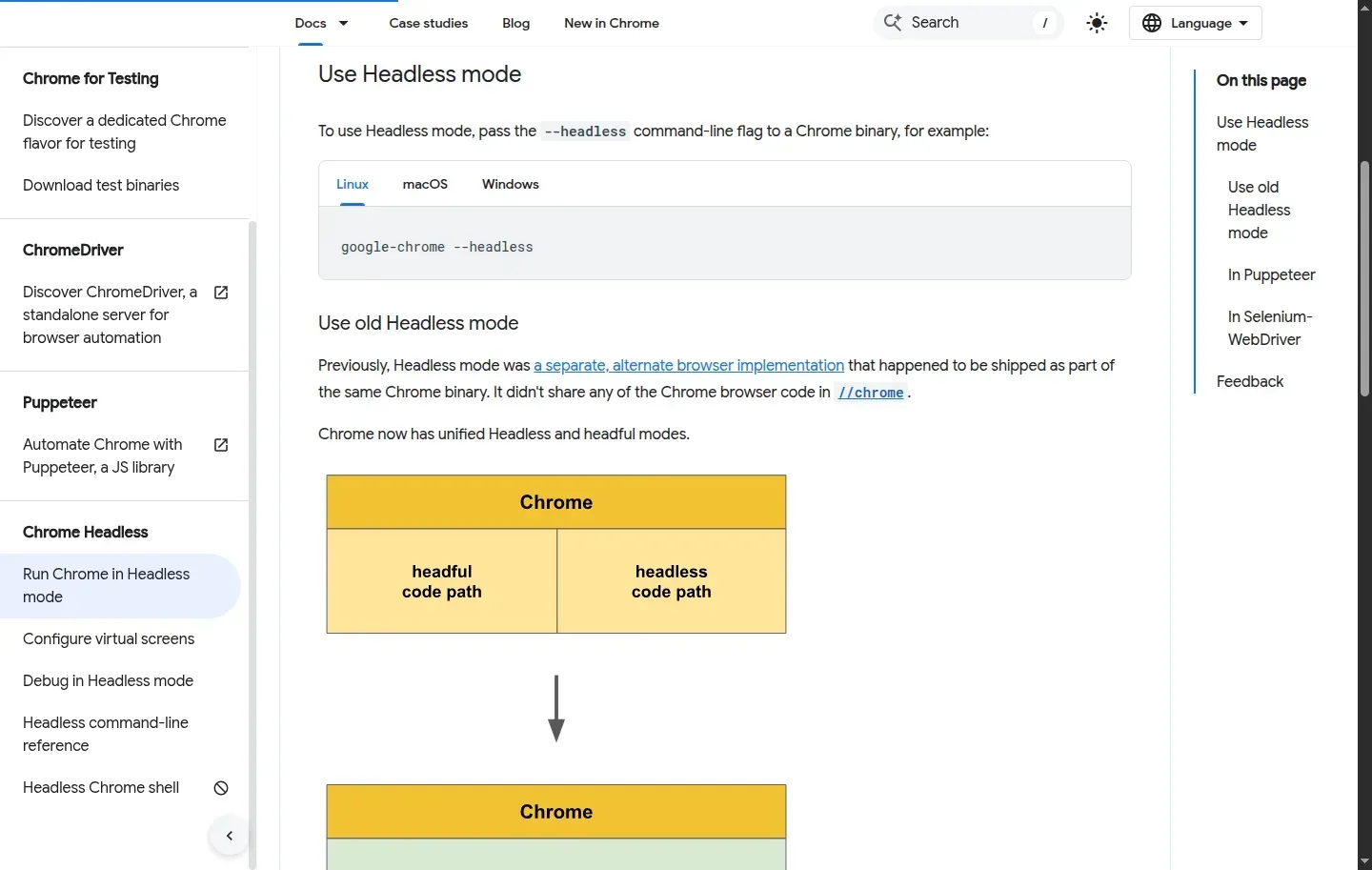 Modern Chrome headless can render pages and take screenshots. This benchmark measured headful configurations only.
Chrome’s modern headless mode shares the headful browser implementation and can render pages and take screenshots. Unified headless arrived in Chrome 112. From Chrome 132, the old implementation is available only as chrome-headless-shell. Chrome for Developers
Anthropic’s computer-use reference setup uses screenshots and a virtual X11 display through Xvfb. Playwright MCP reads the accessibility tree by default, with vision optional, although it runs headed by default. The agent’s input method and browser mode are separate choices. Anthropic documentation, Playwright MCP
Assess headless for unattended extraction or automated checks, and headful for desktop interaction or human intervention. Check GPU rendering in either mode.
Our bench measured headful browsers only. It cannot quantify headless memory savings or compare detection between modes. The separate headless vs headful browser article covers that decision.
Back to Top: Running AI agents in a headful browser: measured CPU and memory costs